


Design reviews get messy fast. The structural engineer updates column locations, but the MEP team doesn't find out until ductwork conflicts surface in the next coordination meeting. The architect sends markup comments by email, but half the team misses the thread. By the time everyone is in the same room again, nobody agrees on which revision is current or who was supposed to resolve what.
It doesn't have to work that way. Drawboard Projects keeps coordination in one place, with feedback anchored directly to the drawings where decisions are made. Markups and comments sync in real time across every discipline, so nobody is reacting to yesterday's version. Follow-ups become Tasks pinned to the exact location on the drawing that created them, with an owner, a due date, and a status that updates as work moves forward.
By the time you reach sign-off, the full record is already there. Every markup, comment, Task update, and revision is logged and traceable, so auditing decisions or handing off to the next phase doesn't require anyone to piece together what happened from memory.
Here's how Drawboard Projects makes that possible, step by step.
The problem isn't that reviews are inherently complex. It's that the standard workflow splits coordination across too many disconnected systems. When feedback lives in email, meeting notes exist in separate documents, and action items get tracked in spreadsheets, you lose track of what was said and why. Coordination meetings get spent reconstructing context instead of resolving conflicts.
Reviews typically slow down for a few common reasons:
Centralizing the workflow means each review round produces a clean, actionable output:
When coordination stays in the drawings instead of splitting across tools, teams catch conflicts during design rather than discovering them in the field. And the documentation trail required for sign-off is captured as the review progresses, so you’re not reconstructing it later.
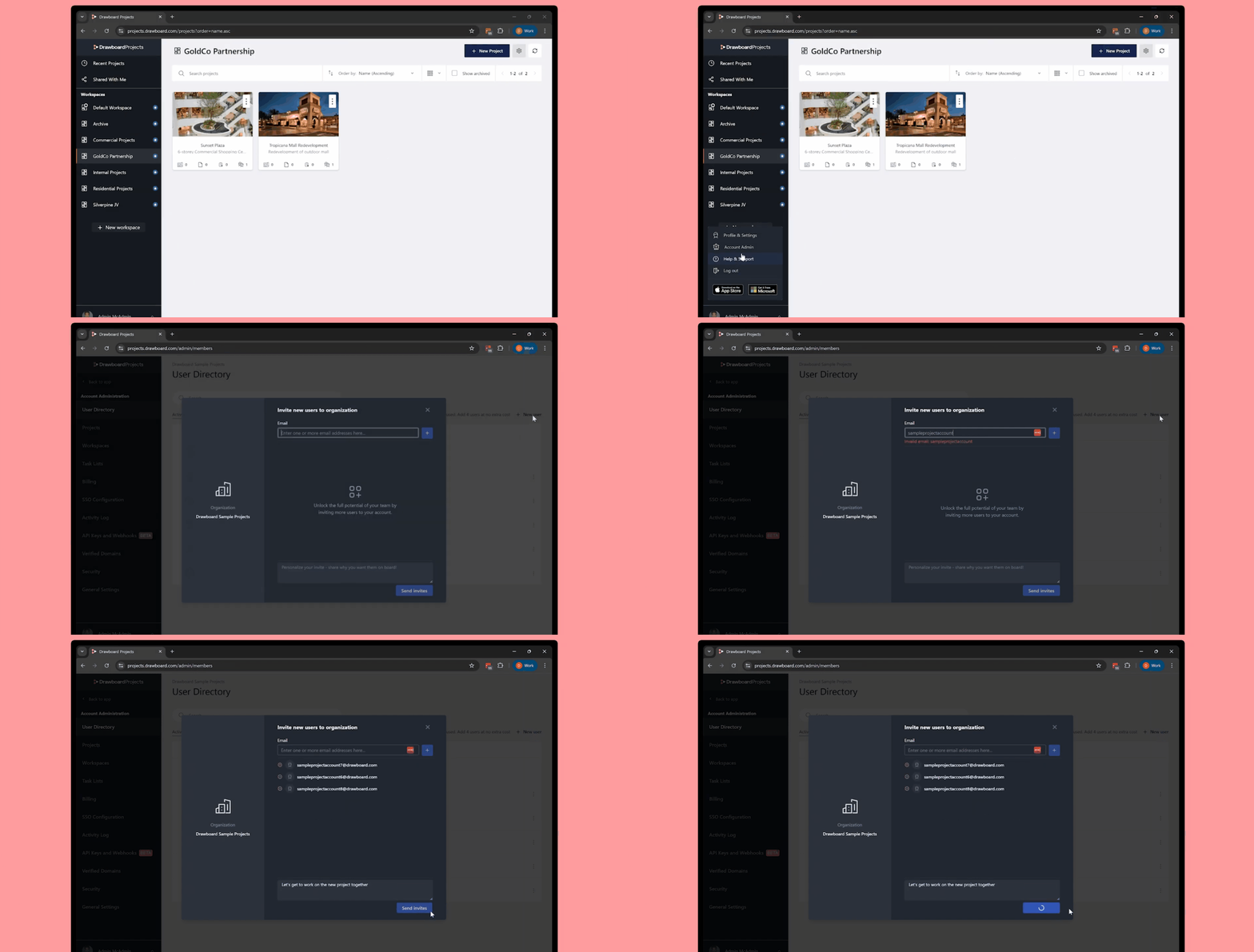
Before you upload anything, remove the easiest failure point: access.
Get the internal team into the workspace early so review participation isn't blocked by invitations and permissions the day of the meeting. If you're running a multi-discipline coordination round, invite the people who will actually resolve comments, not just the people who will attend the call. That means including discipline leads from structural, MEP, architecture, and civil who can mark up drawings and assign work to their teams.
A simple way to keep setup clean:
When assigning roles, project managers and BIM coordinators typically work best as project Owners or Admins, since they’re coordinating across disciplines and need to manage uploads, access, and invitations. Discipline leads usually join as Collaborators so they can mark up drawings and create Tasks for their teams. For external reviewers, invite them as time-limited guests with either Collaborator access (markup and comment) or Reader access (view-only), depending on how hands-on you need them to be.
That division is small, but it keeps the review from turning into "one person chasing everyone."
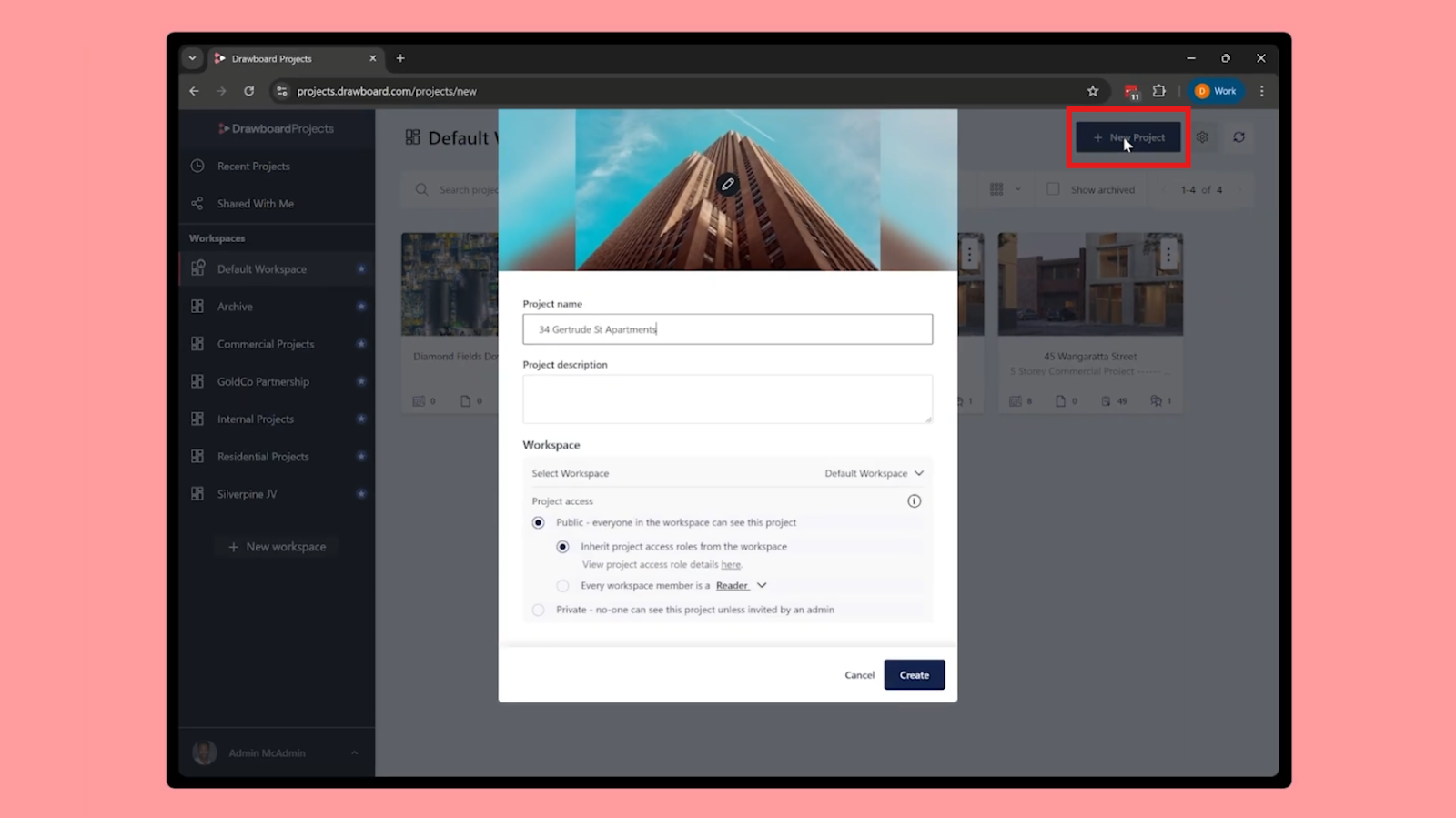
Create a new project for the review round. Treat it like a container for a milestone package: the drawing set plus any supporting documents that reviewers will reference while making decisions.
Once the project exists, upload the drawings and supporting documents, then use bulk actions to apply review statuses and assignments across the set. The objective is to make the package review-ready quickly and consistently, so reviewers can open the project and start immediately without asking which sheets they own or what’s still outstanding.
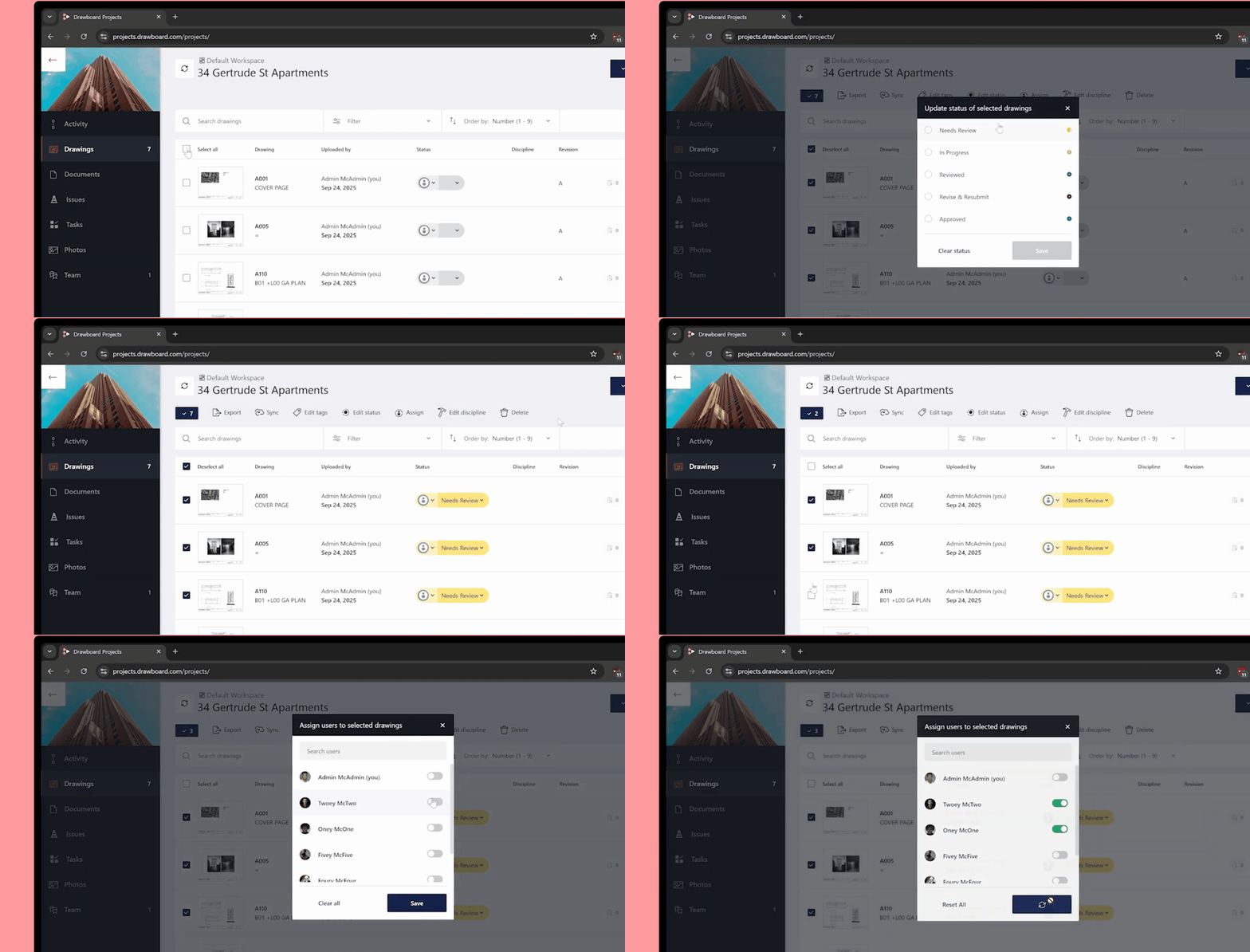
You can keep this step tight with a few habits:
By the end of this step, every sheet should be in the project, assigned to a reviewer, and set to a status that makes the next action obvious.
For example, a 30-story mixed-use project might have 200+ sheets split across architecture (A-series), structural (S-series), MEP (M/E/P-series), and civil (C-series). Bulk assignment lets you route each discipline's sheets to the right lead in minutes rather than assigning them one by one. Sheet names, numbers, and revision markers stay consistent as the set evolves, which matters when you're managing hundreds of sheets across multiple coordination cycles.
This is the workflow shift that makes everything else easier: keep review work anchored to the drawing location it relates to.
During the review, reviewers typically contribute in four ways:
Each serves a different purpose, but they work together to keep feedback contextual. Markups show where the problem is, comments explain why it matters, and Tasks or Issues ensure someone is responsible for resolving it.
Here’s what that looks like in practice: During a coordination review, the mechanical engineer spots a duct routing conflict on sheet M-301. They mark it up with a cloud, add a comment explaining the constraint, then create a Task assigned to the structural lead to confirm clearance and propose the best fix.
The structural lead sees the Task in their list, clicks through to the pinned location on the drawing, and replies in the same thread. No email chain. No guessing which sheet a note referred to. No hunting through meeting notes weeks later to remember what was decided.
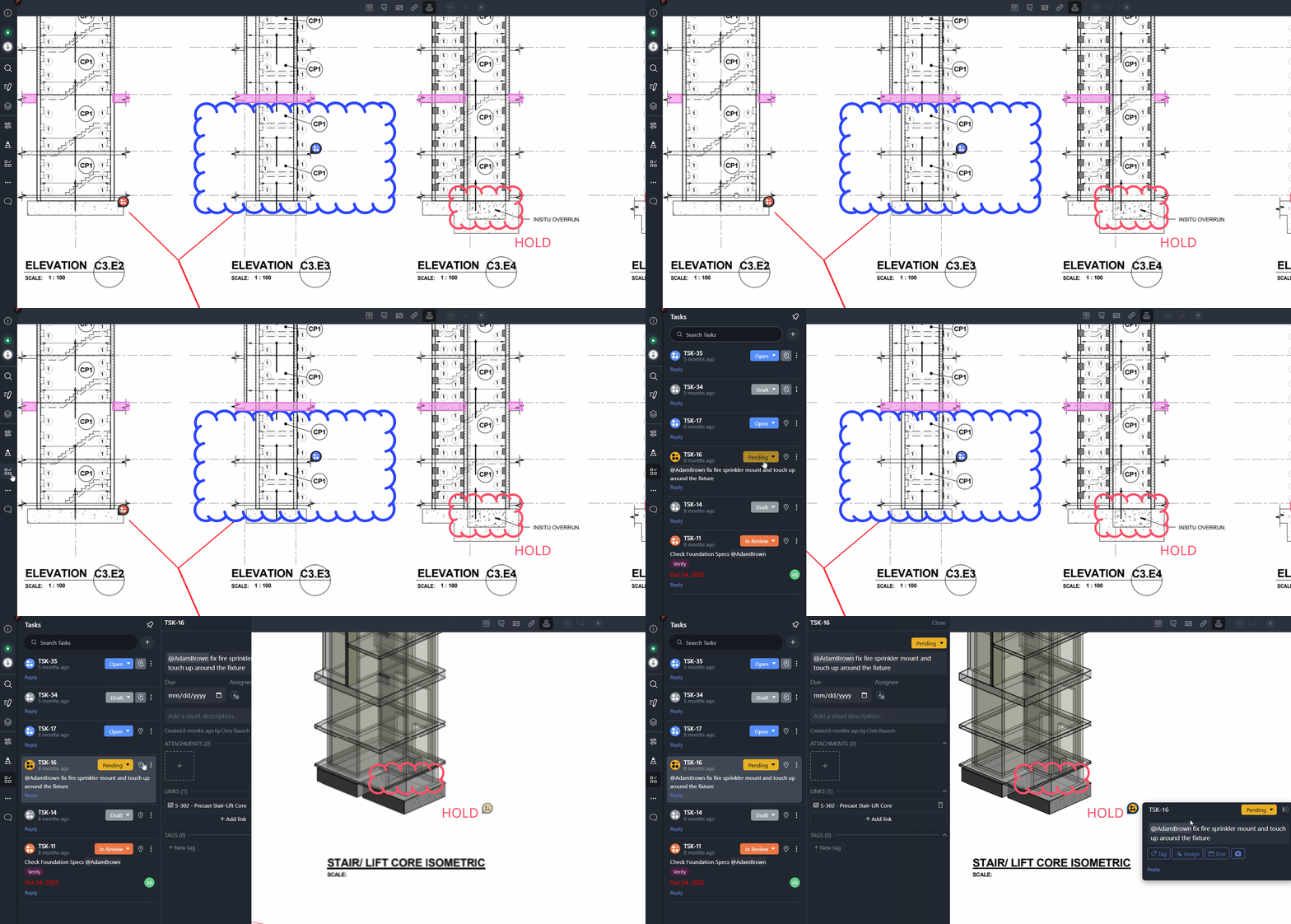
The structural engineer sees the Task in their list, clicks through to view the markup in context on the drawing, and responds directly in the thread. No email chain. No wondering which sheet the comment referred to. No hunting through meeting notes three weeks later trying to remember what was decided.
To keep this workflow clean, especially when multiple disciplines are marking up the same sheets:
Tasks are what prevent coordination drift. Each Task gets pinned to a specific location on the drawing with ownership, due dates, and visible status that updates as work progresses. The centralized Task List lets you manage progress across the full drawing set without hunting sheet by sheet to see what's still open.
Most reviews don't stall in the meeting. They stall between meetings, when it's unclear what's still open and who is responsible for moving it.
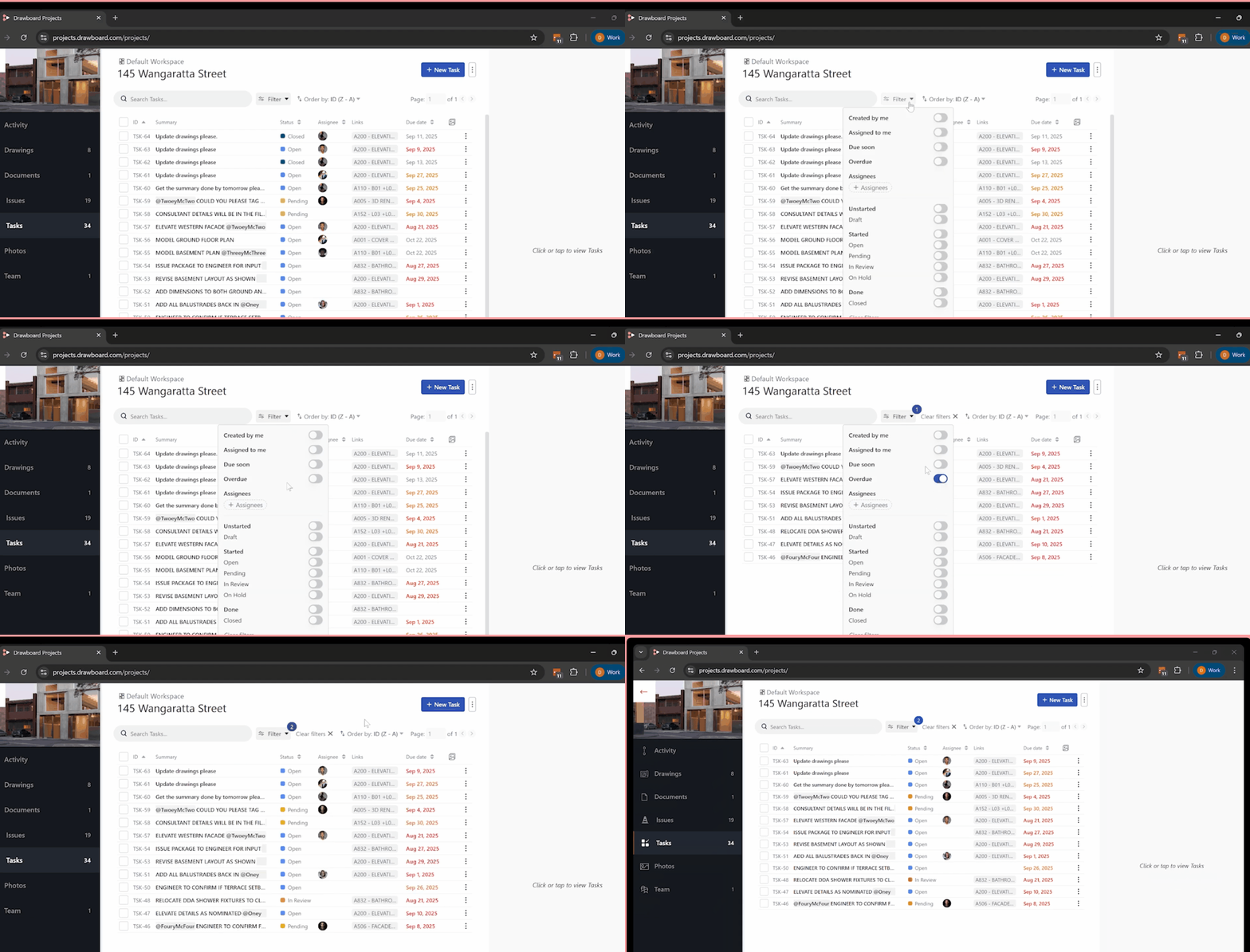
Instead of chasing people for status updates, use the project's live data to keep momentum. The Task List gives you a project-wide view of all open items across the entire drawing set, and filtering lets you cut through the noise:
During coordination meetings, you can pull up the Task List filtered to a specific discipline and work through their open items one by one. A project manager can filter to "overdue" and immediately see what's blocking progress. A design lead can filter to "assigned to me" and verify all their team's feedback has been addressed before recommending sign-off.
The practical benefit is that your next coordination touchpoint becomes action-focused. You're not re-litigating what was said last week. You're clearing blockers, confirming approvals, and moving the package forward.
External feedback is often essential, but it can also be where version control falls apart if people are emailing PDFs back and forth.
Drawboard Projects supports guest participation so clients, specialty consultants, and contractors can access the review and contribute without needing a full account. Access can be time-limited, which is useful whether you're running a two-hour owner review meeting or giving a contractor three weeks to provide constructability feedback.
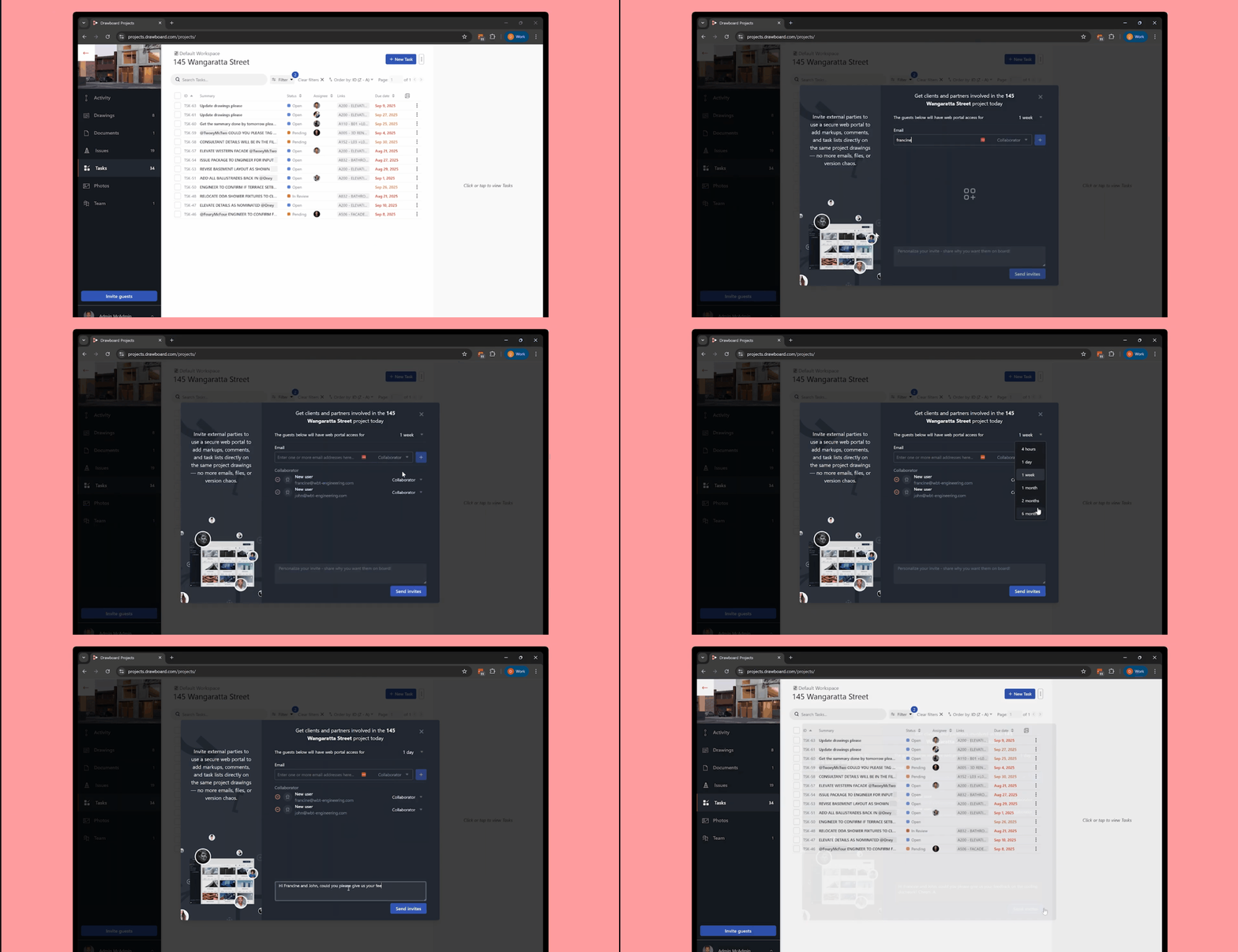
Typical guests include owners and clients reviewing for design sign-off, specialty consultants like acousticians or façade engineers, contractors providing constructability input, and permitting authorities conducting compliance reviews.
If you’re unsure which level to use, default internal reviewers to Collaborator, keep Admin limited to the people managing access and the drawing set, and use Reader for stakeholders who only need visibility.
To keep guest input clean, set expectations up front:
That consistency means when the guest access window closes, you're not left translating scattered feedback into a format your team can actually use. Everything is already captured where it needs to be.
A good format is the one that captures decisions in the moment and avoids rework later.
For in-person sessions, a reliable pattern is to present the drawing on one shared screen while participants mark up on their own devices as the discussion happens. Everyone sees markups appear in real time on the main display, which keeps the conversation grounded in what's actually on the sheet. Close each sheet with a clear outcome before moving to the next one so you don't re-open debate later.
For remote sessions, the key is alignment. Keep the scope explicit from the start: which sheets you're reviewing, which revision everyone should be looking at, and what decisions you need to make. Use real-time updates so everyone is working on the same live drawings, not screenshots or PDFs they downloaded yesterday. End with a clear action picture showing what's approved, what's approved with changes, and what requires rework or follow-up Tasks.
Hybrid reviews work the same way. Some team members join from the office, others hop in remotely, but everyone accesses the same live drawings regardless of location. There's no information gap between in-person and remote participants because the coordination workspace is the same for everyone.
Closeout is where teams either lock in clarity or reintroduce chaos. The objective is to leave the project with one authoritative record of what happened in the review.
A clean wrap-up usually includes:
Treating closeout as its own step prevents the "we reviewed it, but nobody can find the decisions" problem that leads to rework.
When the review closes, you should have one authoritative record: markups anchored to locations, Tasks tracked through resolution, and revisions managed in a way that makes it easy to compare what changed. If a new issue drop arrives, you can compare revisions and carry forward the markups that still apply instead of recreating context from scratch.
That record supports sign-off, contractor handoff, and compliance documentation because the decisions and their context are already captured inside the drawing set.
Design reviews work best when you can answer three questions without digging through emails: what changed, who owns it, and what's due next.
When the drawing set is the coordination workspace instead of just a reference document, those answers are already there. Feedback stays anchored to the drawings where decisions were made. Tasks track accountability from issue to resolution. And the review history builds itself as coordination progresses, so sign-off documentation doesn't require reconstruction after the fact.
The result: one shared review record that reduces version drift, shortens the gap between coordination meetings, and cuts rework on the next revision round. That's what Drawboard Projects is built to deliver.
Curious how Drawboard Projects can help streamline your design reviews? Schedule a demo and we'll walk you through it.
Design reviews get messy fast. The structural engineer updates column locations, but the MEP team doesn't find out until ductwork conflicts surface in the next coordination meeting. The architect sends markup comments by email, but half the team misses the thread. By the time everyone is in the same room again, nobody agrees on which revision is current or who was supposed to resolve what.
It doesn't have to work that way. Drawboard Projects keeps coordination in one place, with feedback anchored directly to the drawings where decisions are made. Markups and comments sync in real time across every discipline, so nobody is reacting to yesterday's version. Follow-ups become Tasks pinned to the exact location on the drawing that created them, with an owner, a due date, and a status that updates as work moves forward.
By the time you reach sign-off, the full record is already there. Every markup, comment, Task update, and revision is logged and traceable, so auditing decisions or handing off to the next phase doesn't require anyone to piece together what happened from memory.
Here's how Drawboard Projects makes that possible, step by step.
The problem isn't that reviews are inherently complex. It's that the standard workflow splits coordination across too many disconnected systems. When feedback lives in email, meeting notes exist in separate documents, and action items get tracked in spreadsheets, you lose track of what was said and why. Coordination meetings get spent reconstructing context instead of resolving conflicts.
Reviews typically slow down for a few common reasons:
Centralizing the workflow means each review round produces a clean, actionable output:
When coordination stays in the drawings instead of splitting across tools, teams catch conflicts during design rather than discovering them in the field. And the documentation trail required for sign-off is captured as the review progresses, so you’re not reconstructing it later.
Before you upload anything, remove the easiest failure point: access.
Get the internal team into the workspace early so review participation isn't blocked by invitations and permissions the day of the meeting. If you're running a multi-discipline coordination round, invite the people who will actually resolve comments, not just the people who will attend the call. That means including discipline leads from structural, MEP, architecture, and civil who can mark up drawings and assign work to their teams.
A simple way to keep setup clean:
When assigning roles, project managers and BIM coordinators typically work best as project Owners or Admins, since they’re coordinating across disciplines and need to manage uploads, access, and invitations. Discipline leads usually join as Collaborators so they can mark up drawings and create Tasks for their teams. For external reviewers, invite them as time-limited guests with either Collaborator access (markup and comment) or Reader access (view-only), depending on how hands-on you need them to be.
That division is small, but it keeps the review from turning into "one person chasing everyone."
Create a new project for the review round. Treat it like a container for a milestone package: the drawing set plus any supporting documents that reviewers will reference while making decisions.
Once the project exists, upload the drawings and supporting documents, then use bulk actions to apply review statuses and assignments across the set. The objective is to make the package review-ready quickly and consistently, so reviewers can open the project and start immediately without asking which sheets they own or what’s still outstanding.
You can keep this step tight with a few habits:
By the end of this step, every sheet should be in the project, assigned to a reviewer, and set to a status that makes the next action obvious.
For example, a 30-story mixed-use project might have 200+ sheets split across architecture (A-series), structural (S-series), MEP (M/E/P-series), and civil (C-series). Bulk assignment lets you route each discipline's sheets to the right lead in minutes rather than assigning them one by one. Sheet names, numbers, and revision markers stay consistent as the set evolves, which matters when you're managing hundreds of sheets across multiple coordination cycles.
This is the workflow shift that makes everything else easier: keep review work anchored to the drawing location it relates to.
During the review, reviewers typically contribute in four ways:
Each serves a different purpose, but they work together to keep feedback contextual. Markups show where the problem is, comments explain why it matters, and Tasks or Issues ensure someone is responsible for resolving it.
Here’s what that looks like in practice: During a coordination review, the mechanical engineer spots a duct routing conflict on sheet M-301. They mark it up with a cloud, add a comment explaining the constraint, then create a Task assigned to the structural lead to confirm clearance and propose the best fix.
The structural lead sees the Task in their list, clicks through to the pinned location on the drawing, and replies in the same thread. No email chain. No guessing which sheet a note referred to. No hunting through meeting notes weeks later to remember what was decided.
The structural engineer sees the Task in their list, clicks through to view the markup in context on the drawing, and responds directly in the thread. No email chain. No wondering which sheet the comment referred to. No hunting through meeting notes three weeks later trying to remember what was decided.
To keep this workflow clean, especially when multiple disciplines are marking up the same sheets:
Tasks are what prevent coordination drift. Each Task gets pinned to a specific location on the drawing with ownership, due dates, and visible status that updates as work progresses. The centralized Task List lets you manage progress across the full drawing set without hunting sheet by sheet to see what's still open.
Most reviews don't stall in the meeting. They stall between meetings, when it's unclear what's still open and who is responsible for moving it.
Instead of chasing people for status updates, use the project's live data to keep momentum. The Task List gives you a project-wide view of all open items across the entire drawing set, and filtering lets you cut through the noise:
During coordination meetings, you can pull up the Task List filtered to a specific discipline and work through their open items one by one. A project manager can filter to "overdue" and immediately see what's blocking progress. A design lead can filter to "assigned to me" and verify all their team's feedback has been addressed before recommending sign-off.
The practical benefit is that your next coordination touchpoint becomes action-focused. You're not re-litigating what was said last week. You're clearing blockers, confirming approvals, and moving the package forward.
External feedback is often essential, but it can also be where version control falls apart if people are emailing PDFs back and forth.
Drawboard Projects supports guest participation so clients, specialty consultants, and contractors can access the review and contribute without needing a full account. Access can be time-limited, which is useful whether you're running a two-hour owner review meeting or giving a contractor three weeks to provide constructability feedback.
Typical guests include owners and clients reviewing for design sign-off, specialty consultants like acousticians or façade engineers, contractors providing constructability input, and permitting authorities conducting compliance reviews.
If you’re unsure which level to use, default internal reviewers to Collaborator, keep Admin limited to the people managing access and the drawing set, and use Reader for stakeholders who only need visibility.
To keep guest input clean, set expectations up front:
That consistency means when the guest access window closes, you're not left translating scattered feedback into a format your team can actually use. Everything is already captured where it needs to be.
A good format is the one that captures decisions in the moment and avoids rework later.
For in-person sessions, a reliable pattern is to present the drawing on one shared screen while participants mark up on their own devices as the discussion happens. Everyone sees markups appear in real time on the main display, which keeps the conversation grounded in what's actually on the sheet. Close each sheet with a clear outcome before moving to the next one so you don't re-open debate later.
For remote sessions, the key is alignment. Keep the scope explicit from the start: which sheets you're reviewing, which revision everyone should be looking at, and what decisions you need to make. Use real-time updates so everyone is working on the same live drawings, not screenshots or PDFs they downloaded yesterday. End with a clear action picture showing what's approved, what's approved with changes, and what requires rework or follow-up Tasks.
Hybrid reviews work the same way. Some team members join from the office, others hop in remotely, but everyone accesses the same live drawings regardless of location. There's no information gap between in-person and remote participants because the coordination workspace is the same for everyone.
Closeout is where teams either lock in clarity or reintroduce chaos. The objective is to leave the project with one authoritative record of what happened in the review.
A clean wrap-up usually includes:
Treating closeout as its own step prevents the "we reviewed it, but nobody can find the decisions" problem that leads to rework.
When the review closes, you should have one authoritative record: markups anchored to locations, Tasks tracked through resolution, and revisions managed in a way that makes it easy to compare what changed. If a new issue drop arrives, you can compare revisions and carry forward the markups that still apply instead of recreating context from scratch.
That record supports sign-off, contractor handoff, and compliance documentation because the decisions and their context are already captured inside the drawing set.
Design reviews work best when you can answer three questions without digging through emails: what changed, who owns it, and what's due next.
When the drawing set is the coordination workspace instead of just a reference document, those answers are already there. Feedback stays anchored to the drawings where decisions were made. Tasks track accountability from issue to resolution. And the review history builds itself as coordination progresses, so sign-off documentation doesn't require reconstruction after the fact.
The result: one shared review record that reduces version drift, shortens the gap between coordination meetings, and cuts rework on the next revision round. That's what Drawboard Projects is built to deliver.
Curious how Drawboard Projects can help streamline your design reviews? Schedule a demo and we'll walk you through it.


We are a PDF and collaboration company. We believe that creating more effective connections between people reduces waste.
Our best work has been overtaken by busywork. That’s why we’ve created ways to help people get back to working wonders without any paper in sight.
Drawboard PDF lets you mark up and share with ease, and Drawboard Projects brings collaborative design review to architecture and engineering teams.
At Drawboard, we work our magic so our customers can get back to working theirs.
We are a PDF and collaboration company. We believe that creating more effective connections between people reduces waste.
Our best work has been overtaken by busywork. That’s why we’ve created ways to help people get back to working wonders without any paper in sight.
Drawboard PDF lets you mark up and share with ease, and Drawboard Projects brings collaborative design review to architecture and engineering teams.
At Drawboard, we work our magic so our customers can get back to working theirs.


