


"Can issues raised in Drawboard go straight into Forma?"
That was the number one question at our booth at Autodesk University 2026 in Las Vegas. We heard it from AEC teams every single day of the show. So we built it.
Issues raised in Drawboard Projects now escalate straight into Autodesk Forma Issues, with photos, the drawing snapshot, dates and details attached. Your site and review teams keep working in Drawboard. Forma stays the single record everyone else relies on.
At AU2026 we showed hundreds of AEC teams how Drawboard Projects works hand in hand with Autodesk Forma. The same gap came up again and again.
The people finding issues, on site and in drawing review, work best in a fast markup tool. The people managing the project need every issue in Forma. Until now, getting an issue from one to the other meant retyping it, re-attaching photos and hoping nothing got lost.
The Drawboard Forma integration closes that gap. Issues are raised where the work happens and land in Forma with their full context.
1. Raise the issue in Drawboard Projects
Mark up the drawing, snap a photo and log the issue right on the sheet. Then select Escalate to Issue.

2. Send it to Forma, fully loaded
Choose the Forma issue type and root cause, set start and due dates, add location details and create the issue. The drawing snapshot and photos travel with it, so nobody has to go hunting for context.

3. Track it in both tools, linked for good
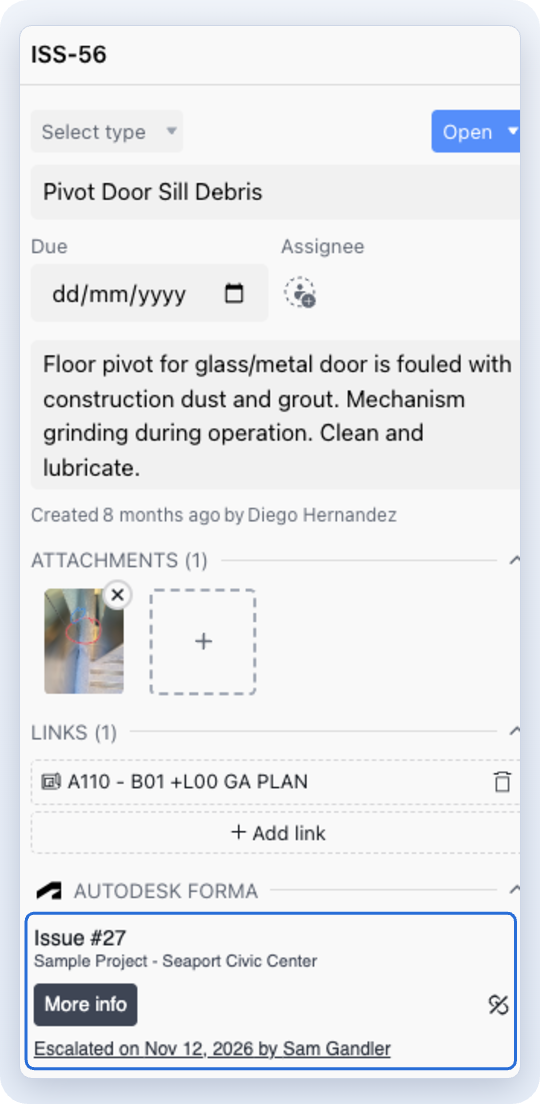
The issue in Drawboard shows its Forma issue number, who escalated it and when, with one click through to Forma. Already logged it in Forma? Select Link to existing Issue instead of creating a duplicate.
Issues are only half the story. Drawings move both ways between Autodesk Forma and Drawboard Projects, so review happens in Drawboard while Forma stays the record set.
Can I send issues from Drawboard Projects to Autodesk Forma?
Yes. Select Escalate to Issue on any Drawboard Projects issue to create an Autodesk Forma Issue, with photos, a drawing snapshot, dates and location attached.
What if the issue already exists in Forma?
Use Link to existing Issue. The Drawboard issue links to the Forma issue instead of creating a duplicate.
Do reviewers need an Autodesk seat?
No. Free guests can join live markup sessions in Drawboard Projects without an Autodesk seat.
Which plans include the Forma integration?
The Forma integration is included on Drawboard Projects Growth and Enterprise plans.
Book a quick walkthrough with the team, or start a free trial and connect your Forma hub yourself.
"Can issues raised in Drawboard go straight into Forma?"
That was the number one question at our booth at Autodesk University 2026 in Las Vegas. We heard it from AEC teams every single day of the show. So we built it.
Issues raised in Drawboard Projects now escalate straight into Autodesk Forma Issues, with photos, the drawing snapshot, dates and details attached. Your site and review teams keep working in Drawboard. Forma stays the single record everyone else relies on.
At AU2026 we showed hundreds of AEC teams how Drawboard Projects works hand in hand with Autodesk Forma. The same gap came up again and again.
The people finding issues, on site and in drawing review, work best in a fast markup tool. The people managing the project need every issue in Forma. Until now, getting an issue from one to the other meant retyping it, re-attaching photos and hoping nothing got lost.
The Drawboard Forma integration closes that gap. Issues are raised where the work happens and land in Forma with their full context.
1. Raise the issue in Drawboard Projects
Mark up the drawing, snap a photo and log the issue right on the sheet. Then select Escalate to Issue.
2. Send it to Forma, fully loaded
Choose the Forma issue type and root cause, set start and due dates, add location details and create the issue. The drawing snapshot and photos travel with it, so nobody has to go hunting for context.
3. Track it in both tools, linked for good
The issue in Drawboard shows its Forma issue number, who escalated it and when, with one click through to Forma. Already logged it in Forma? Select Link to existing Issue instead of creating a duplicate.
Issues are only half the story. Drawings move both ways between Autodesk Forma and Drawboard Projects, so review happens in Drawboard while Forma stays the record set.
Can I send issues from Drawboard Projects to Autodesk Forma?
Yes. Select Escalate to Issue on any Drawboard Projects issue to create an Autodesk Forma Issue, with photos, a drawing snapshot, dates and location attached.
What if the issue already exists in Forma?
Use Link to existing Issue. The Drawboard issue links to the Forma issue instead of creating a duplicate.
Do reviewers need an Autodesk seat?
No. Free guests can join live markup sessions in Drawboard Projects without an Autodesk seat.
Which plans include the Forma integration?
The Forma integration is included on Drawboard Projects Growth and Enterprise plans.
Book a quick walkthrough with the team, or start a free trial and connect your Forma hub yourself.


We are a PDF and collaboration company. We believe that creating more effective connections between people reduces waste.
Our best work has been overtaken by busywork. That’s why we’ve created ways to help people get back to working wonders without any paper in sight.
Drawboard PDF lets you mark up and share with ease, and Drawboard Projects brings collaborative design review to architecture and engineering teams.
At Drawboard, we work our magic so our customers can get back to working theirs.
We are a PDF and collaboration company. We believe that creating more effective connections between people reduces waste.
Our best work has been overtaken by busywork. That’s why we’ve created ways to help people get back to working wonders without any paper in sight.
Drawboard PDF lets you mark up and share with ease, and Drawboard Projects brings collaborative design review to architecture and engineering teams.
At Drawboard, we work our magic so our customers can get back to working theirs.


