


Construction Idéal is a Canada-based general contractor specialising in commercial and industrial buildings. They’re a lean team of around a dozen office employees and approximately 20 full-time workers, supported by a network of trusted local subcontractors.

With up to 20 concurrent job sites to coordinate, project manager Fabien Migeot saw firsthand the need for a faster, more reliable way to capture plan changes, communicate them, and keep everyone working from the same up-to-date information.
On active construction projects, drawings rarely remain static once work begins.
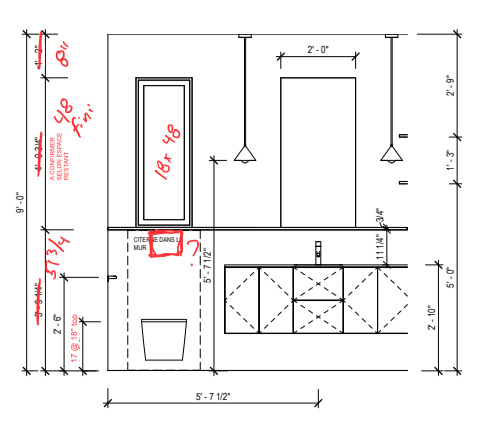
Construction Idéal’s on-site managers typically begin with “reference plans” that are accurate at the start of a project. As work progresses, however, those plans need to absorb a steady stream of adjustments while remaining usable for everyone involved.
“Our foremen often took notes of changes because we have to produce an as-built plan afterward. We can’t really change the reference plan without the risk of losing a trace of what happened.”
In practice, that meant relying heavily on paper. Drawings were annotated by hand, addendums were created and redistributed, and teams had to be diligent about tracking which updates applied where. The process took time and left room for mistakes if changes weren’t captured or shared clearly.
At the same time, not all information lived in one place. Updates might arrive through text messages, emails, Teams conversations, or loose notes from the field, making it difficult to confirm which version of a plan reflected the latest decisions.
Construction Idéal discovered Drawboard PDF while looking for a PDF annotation solution that could work directly inside Microsoft Teams, where much of their day-to-day coordination already takes place. Because Drawboard PDF is available through the Teams app ecosystem, the team was able to trial it in the same environment they already used to communicate with site teams and subcontractors.

For Fabien and his team, usability in the field was non-negotiable. Foremen needed to be able to open a plan and start marking it up immediately, without navigating complex menus or adapting to office-centric workflows.
“Our foremen are action beasts… They want to annotate quick and fast.”
Site teams also needed flexibility in how they captured information beyond line changes on drawings, which often meant adding photos of site conditions, quick notes, or verbal context when typing wasn’t practical. Drawboard’s toolset made it possible to document those details directly on the plan, using whichever input made the most sense in the moment.
“If you think of a way to document something, it’s built in.”
That combination—fast annotation and flexible documentation—helped bridge different working styles. Site teams could rely on quick pen marks, photos, or voice notes, while office staff used more structured annotation tools to clarify intent, all within the same shared plan context.
Construction Idéal started small. The first rollout involved two users: Fabien in the office and a tech-confident foreman in the field. They used Drawboard PDF daily on a $10 million project over the course of a year, treating it as a real-world test rather than a controlled trial.
“It was a bit of a baptism by fire,” Fabien recalls.
Over the year trial period, the team saw how the workflow held up in day-to-day use. Plans changed often, and having one place to capture updates made it easier to see what had changed without relying on constant follow-up.
It worked for both sides of the team. Foremen could mark up drawings quickly on site, and the office could review those changes without having to decipher handwritten notes.
With that foundation in place, Construction Idéal began expanding beyond the initial pilot.
Rather than rolling Drawboard PDF out all at once, the team focused on practical adoption. Training sessions were kept short and hands-on, centred on a small set of core tools and on configuring each person’s tool palette so the actions they needed were immediately accessible.
Some team members were hesitant about the idea of using another piece of software. But once their tools were set up around real workflows, even the most resistant people embraced Drawboard PDF.
Today, Construction Idéal is expanding Drawboard PDF use across all foremen, making tablet-based markup part of standard site operations.
Construction Idéal is focused on practicality, not metrics. They don’t track formal KPIs for these PDF workflows, but the impact has been clear in day-to-day operations, especially when coordinating work across multiple sites at once.
“Drawboard allowed us to group the information in one place, so our workers aren’t searching as much, and reliable, up-to-date information is in one place.”
Keeping changes anchored directly to the drawing reduced the time spent hunting through messages or retracing steps to confirm what was current. It also helped minimise missed updates that can lead to rework or delays.
“Drawboard has helped us avoid many mistakes—especially oversights.”
Another benefit has been how easily teams can work through questions together in context. Instead of describing conditions over the phone or going back and forth in messages, they can open the same drawing and sketch through an idea in real time.
Over time, we've also started receiving calls from our men that sound like this: "Have you got Drawboard open? Okay, go to page 4, I'll draw something for you, you tell me what you think."
As Construction Idéal continues to grow, the team plans to keep Drawboard PDF at the centre of how they coordinate work across sites, using it alongside Microsoft Teams rather than adopting a full construction management platform.
“By using Teams and Drawboard, we can manage multi-million-dollar projects without any issues.”
Going forward, Construction Idéal also intends to play an active role in shaping how Drawboard PDF continues to evolve by sharing regular feedback based on how the tool is used on real job sites.
When questions come up or something doesn’t work quite as expected, Fabien reaches out directly.
“I sometimes send a question or a request about a tool, and I’m always surprised by the response: ‘That’s a good idea, we’ll work on it and include it in a future update.’”
For Construction Idéal, the priority going forward is simple: keep plan changes visible, communication clear, and projects moving forward.
Construction Idéal is a Canada-based general contractor specialising in commercial and industrial buildings. They’re a lean team of around a dozen office employees and approximately 20 full-time workers, supported by a network of trusted local subcontractors.
With up to 20 concurrent job sites to coordinate, project manager Fabien Migeot saw firsthand the need for a faster, more reliable way to capture plan changes, communicate them, and keep everyone working from the same up-to-date information.
On active construction projects, drawings rarely remain static once work begins.
Construction Idéal’s on-site managers typically begin with “reference plans” that are accurate at the start of a project. As work progresses, however, those plans need to absorb a steady stream of adjustments while remaining usable for everyone involved.
“Our foremen often took notes of changes because we have to produce an as-built plan afterward. We can’t really change the reference plan without the risk of losing a trace of what happened.”
In practice, that meant relying heavily on paper. Drawings were annotated by hand, addendums were created and redistributed, and teams had to be diligent about tracking which updates applied where. The process took time and left room for mistakes if changes weren’t captured or shared clearly.
At the same time, not all information lived in one place. Updates might arrive through text messages, emails, Teams conversations, or loose notes from the field, making it difficult to confirm which version of a plan reflected the latest decisions.
Construction Idéal discovered Drawboard PDF while looking for a PDF annotation solution that could work directly inside Microsoft Teams, where much of their day-to-day coordination already takes place. Because Drawboard PDF is available through the Teams app ecosystem, the team was able to trial it in the same environment they already used to communicate with site teams and subcontractors.
For Fabien and his team, usability in the field was non-negotiable. Foremen needed to be able to open a plan and start marking it up immediately, without navigating complex menus or adapting to office-centric workflows.
“Our foremen are action beasts… They want to annotate quick and fast.”
Site teams also needed flexibility in how they captured information beyond line changes on drawings, which often meant adding photos of site conditions, quick notes, or verbal context when typing wasn’t practical. Drawboard’s toolset made it possible to document those details directly on the plan, using whichever input made the most sense in the moment.
“If you think of a way to document something, it’s built in.”
That combination—fast annotation and flexible documentation—helped bridge different working styles. Site teams could rely on quick pen marks, photos, or voice notes, while office staff used more structured annotation tools to clarify intent, all within the same shared plan context.
Construction Idéal started small. The first rollout involved two users: Fabien in the office and a tech-confident foreman in the field. They used Drawboard PDF daily on a $10 million project over the course of a year, treating it as a real-world test rather than a controlled trial.
“It was a bit of a baptism by fire,” Fabien recalls.
Over the year trial period, the team saw how the workflow held up in day-to-day use. Plans changed often, and having one place to capture updates made it easier to see what had changed without relying on constant follow-up.
It worked for both sides of the team. Foremen could mark up drawings quickly on site, and the office could review those changes without having to decipher handwritten notes.
With that foundation in place, Construction Idéal began expanding beyond the initial pilot.
Rather than rolling Drawboard PDF out all at once, the team focused on practical adoption. Training sessions were kept short and hands-on, centred on a small set of core tools and on configuring each person’s tool palette so the actions they needed were immediately accessible.
Some team members were hesitant about the idea of using another piece of software. But once their tools were set up around real workflows, even the most resistant people embraced Drawboard PDF.
Today, Construction Idéal is expanding Drawboard PDF use across all foremen, making tablet-based markup part of standard site operations.
Construction Idéal is focused on practicality, not metrics. They don’t track formal KPIs for these PDF workflows, but the impact has been clear in day-to-day operations, especially when coordinating work across multiple sites at once.
“Drawboard allowed us to group the information in one place, so our workers aren’t searching as much, and reliable, up-to-date information is in one place.”
Keeping changes anchored directly to the drawing reduced the time spent hunting through messages or retracing steps to confirm what was current. It also helped minimise missed updates that can lead to rework or delays.
“Drawboard has helped us avoid many mistakes—especially oversights.”
Another benefit has been how easily teams can work through questions together in context. Instead of describing conditions over the phone or going back and forth in messages, they can open the same drawing and sketch through an idea in real time.
Over time, we've also started receiving calls from our men that sound like this: "Have you got Drawboard open? Okay, go to page 4, I'll draw something for you, you tell me what you think."
As Construction Idéal continues to grow, the team plans to keep Drawboard PDF at the centre of how they coordinate work across sites, using it alongside Microsoft Teams rather than adopting a full construction management platform.
“By using Teams and Drawboard, we can manage multi-million-dollar projects without any issues.”
Going forward, Construction Idéal also intends to play an active role in shaping how Drawboard PDF continues to evolve by sharing regular feedback based on how the tool is used on real job sites.
When questions come up or something doesn’t work quite as expected, Fabien reaches out directly.
“I sometimes send a question or a request about a tool, and I’m always surprised by the response: ‘That’s a good idea, we’ll work on it and include it in a future update.’”
For Construction Idéal, the priority going forward is simple: keep plan changes visible, communication clear, and projects moving forward.


We are a PDF and collaboration company. We believe that creating more effective connections between people reduces waste.
Our best work has been overtaken by busywork. That’s why we’ve created ways to help people get back to working wonders without any paper in sight.
Drawboard PDF lets you mark up and share with ease, and Drawboard Projects brings collaborative design review to architecture and engineering teams.
At Drawboard, we work our magic so our customers can get back to working theirs.
We are a PDF and collaboration company. We believe that creating more effective connections between people reduces waste.
Our best work has been overtaken by busywork. That’s why we’ve created ways to help people get back to working wonders without any paper in sight.
Drawboard PDF lets you mark up and share with ease, and Drawboard Projects brings collaborative design review to architecture and engineering teams.
At Drawboard, we work our magic so our customers can get back to working theirs.


