


On-site work rarely plays out exactly as the drawings predict. Installations don’t always align with design intent, unforeseen clashes surface once walls open up, and late design updates can shift priorities without much warning.
For supervisors and field technicians, noticing these issues is only part of the job. The harder part is capturing them clearly, getting timely input from the office, and ensuring nothing gets overlooked as the project moves forward.
Field observations often end up split between photos, messages, email threads, and handwritten notes, which makes it difficult to maintain a clear record of what needs action. When information is scattered, details slip through and progress slows.
Drawboard Projects brings everything into one workspace. Tasks, markups, and discussions stay attached to the drawings and update in real time, giving field and office teams a consistent, shared understanding of what was found and what still needs attention.
Here’s how you can use Drawboard Projects to make on-site work more efficient and reliable.
Before you even reach the site, it’s important to know you’re working from the most current information. Drawboard Projects keeps drawings and Tasks synced in real time, so any updates appear on your device immediately. You’re never left wondering whether the set you’re viewing is the latest or if something changed overnight.
.gif)
At the same time, Drawboard Projects preserves a clear record of earlier versions. Older revisions remain accessible for reference, and overlays highlight exactly what has changed between sets. This makes it easier to understand how the design has evolved and identify areas that may need closer attention during your walkthrough.
.gif)
Your Task List adds another layer of preparation. Tasks logged during earlier site walks or coordination sessions can be filtered by location, discipline, priority, or status, giving you a clear starting point for the day. Instead of arriving and deciding where to begin, you walk in with a focused view of the items that need follow-up and the areas worth revisiting.
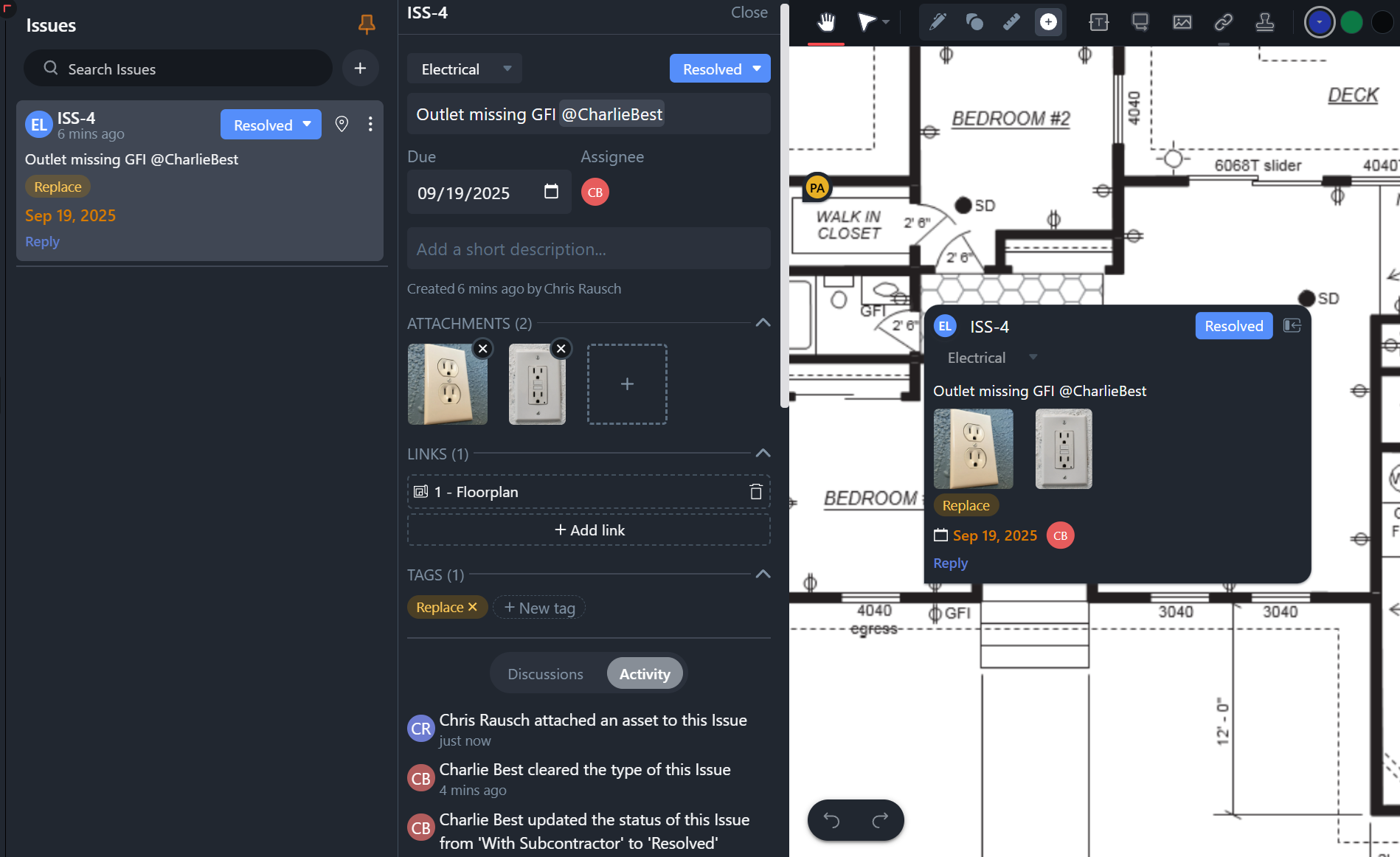
Once you’re on site, work moves quickly. When you spot something that needs attention, whether it’s a clash, a discrepancy, or a QA concern, creating a Task directly on the drawing is the fastest way to capture it with the context intact.
Pinning a Task anchors the issue to its exact location, and from there you can record everything needed to make it actionable. Tasks support the structured details that keep follow-up work clear, including:
Because Tasks sync in real time, anything you add is visible to the office immediately. That means your notes, photos, and descriptions reach the right people without delay, and reviewers can understand what you captured in full context.
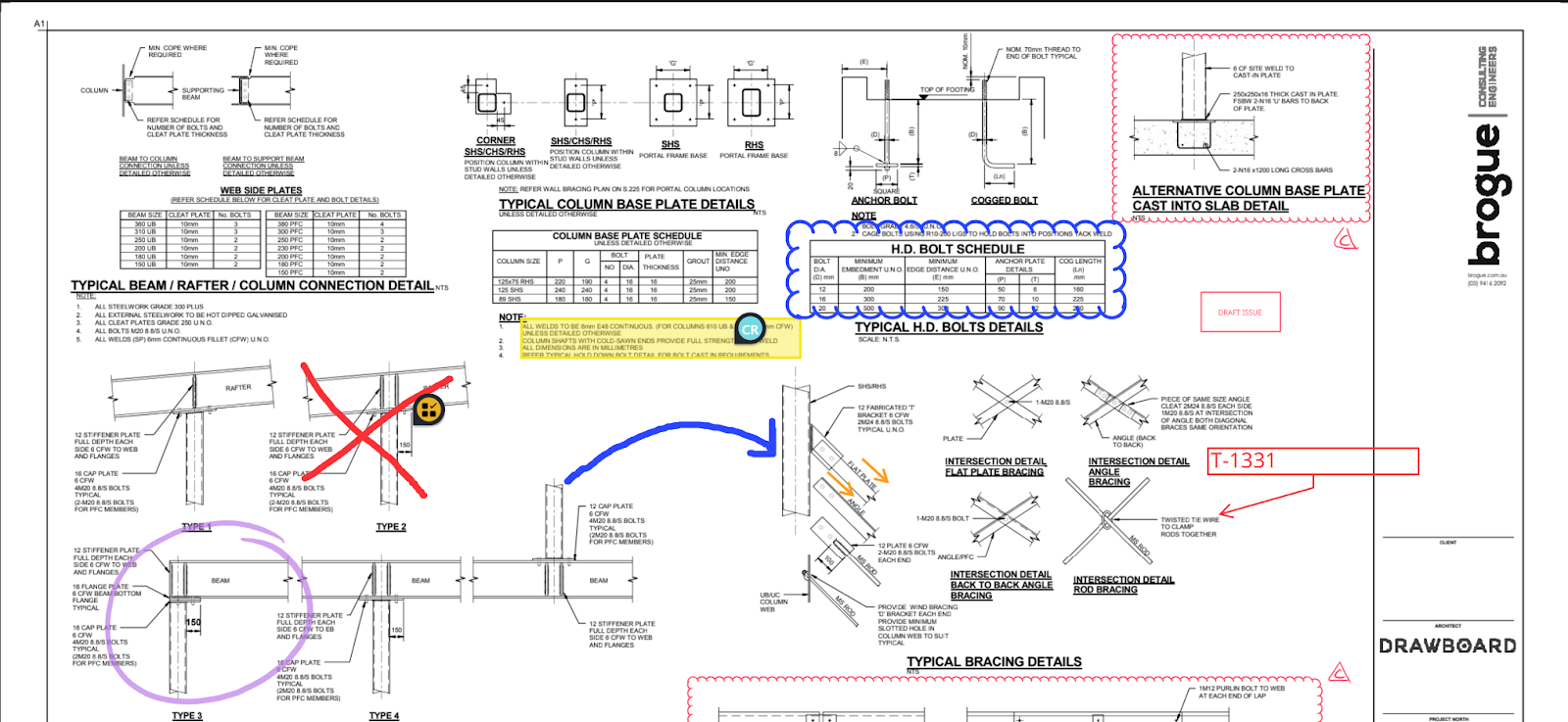
You can also sketch or highlight on the plan around the pinned Task to clarify what needs attention or show how the condition relates to nearby elements.
This keeps all field observations in one place, connected to the drawing, instead of scattered across phones, message threads, and separate checklists.
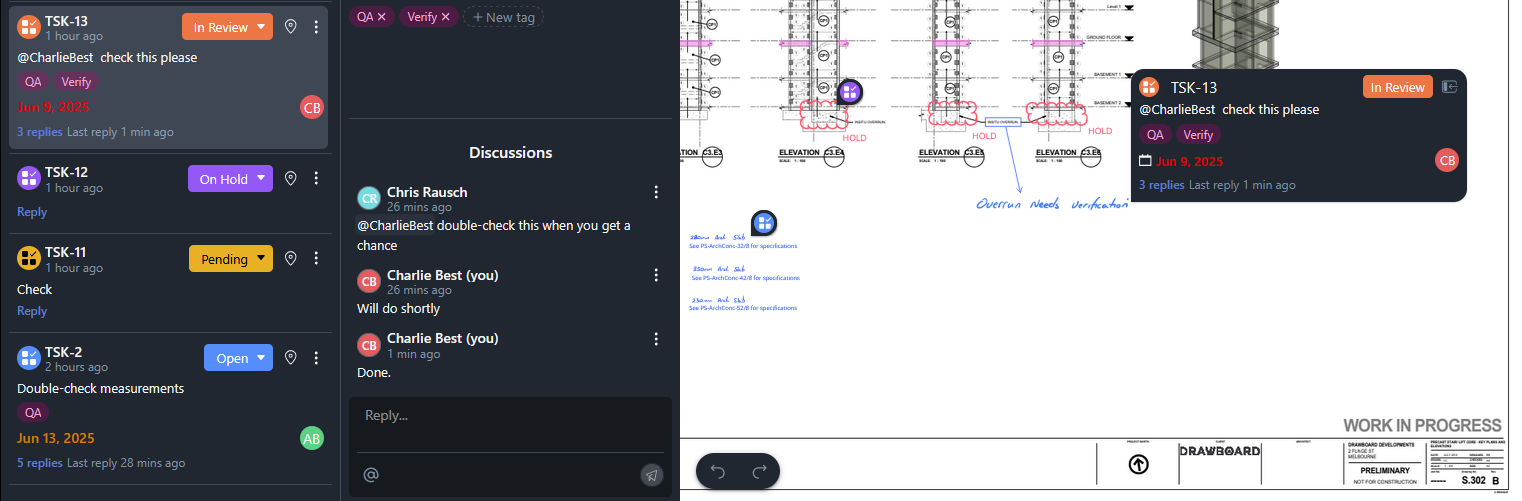
Tasks open up a direct line of communication with designers, engineers, and project managers. Each Task includes its own threaded discussion, keeping every question, approval, and clarification tied to the exact point on the drawing where the issue was found. You can tag specific decision-makers to send them a notification, pulling them into the conversation with full context right when you need their input.
Drawboard Projects keeps your drawings and Tasks up to date wherever you’re working. Because updates sync in real time, office teams see your photos, notes, and pinned Tasks the moment they’re added. With everything in one place — the location, your description, and your visuals — they can quickly understand the issue and provide accurate direction directly on the drawing or in the Task comments.
For field teams, that often means getting the guidance you need while you’re still on site, making it easier to address issues immediately and keep the project moving without unnecessary delays.
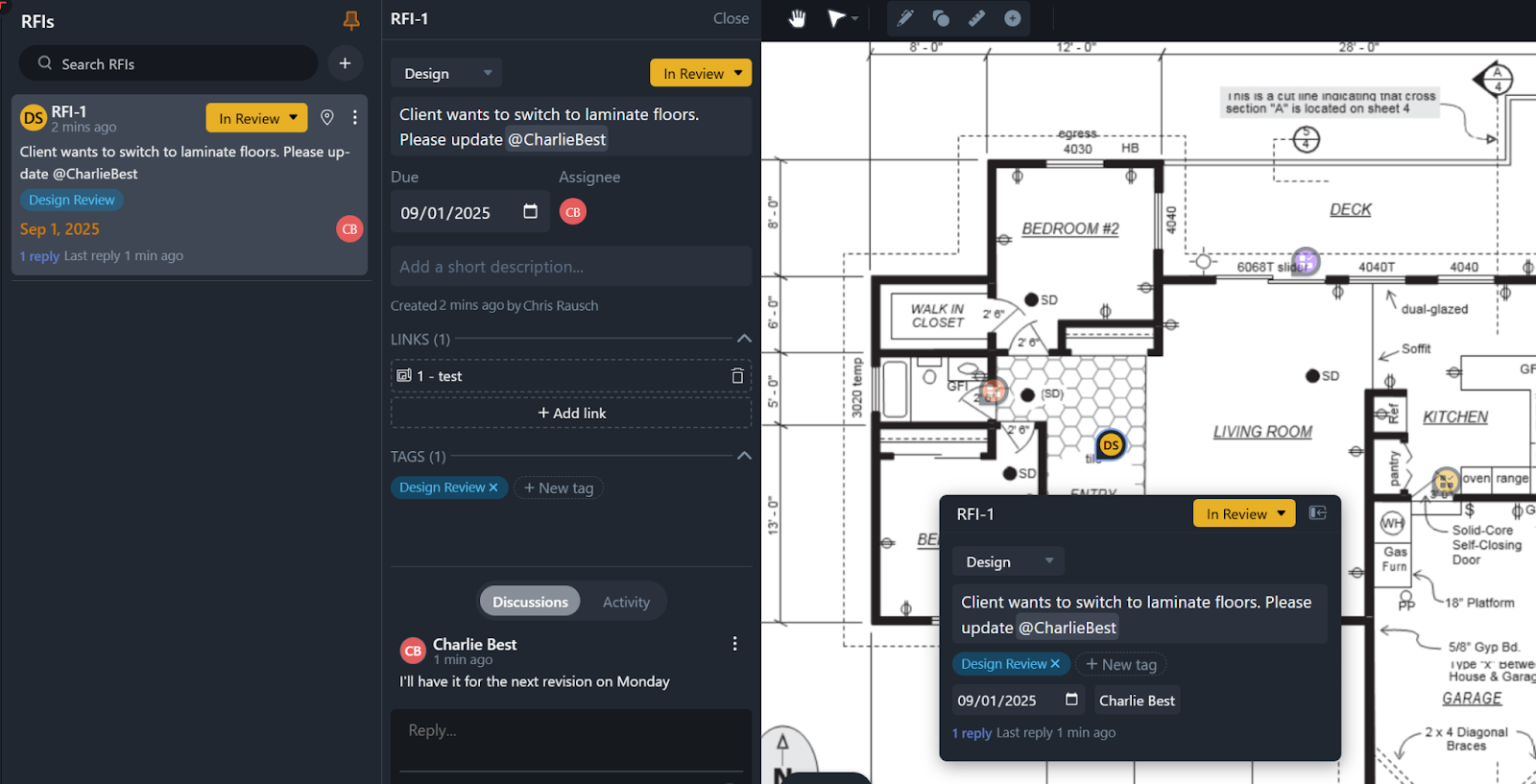
As work progresses, Tasks become a reliable framework for walkthroughs, inspections, and day-to-day coordination. Instead of juggling separate punch lists, handwritten notes, or issues logged in different tools, you can follow and update Tasks directly from the drawing.
During a walkthrough, the workflow becomes much more straightforward. You can:
This creates a live, shared view of progress that both field and office teams can trust. Everything is captured live as you go, ensuring it’s accurate, current, and tied directly to the drawing.
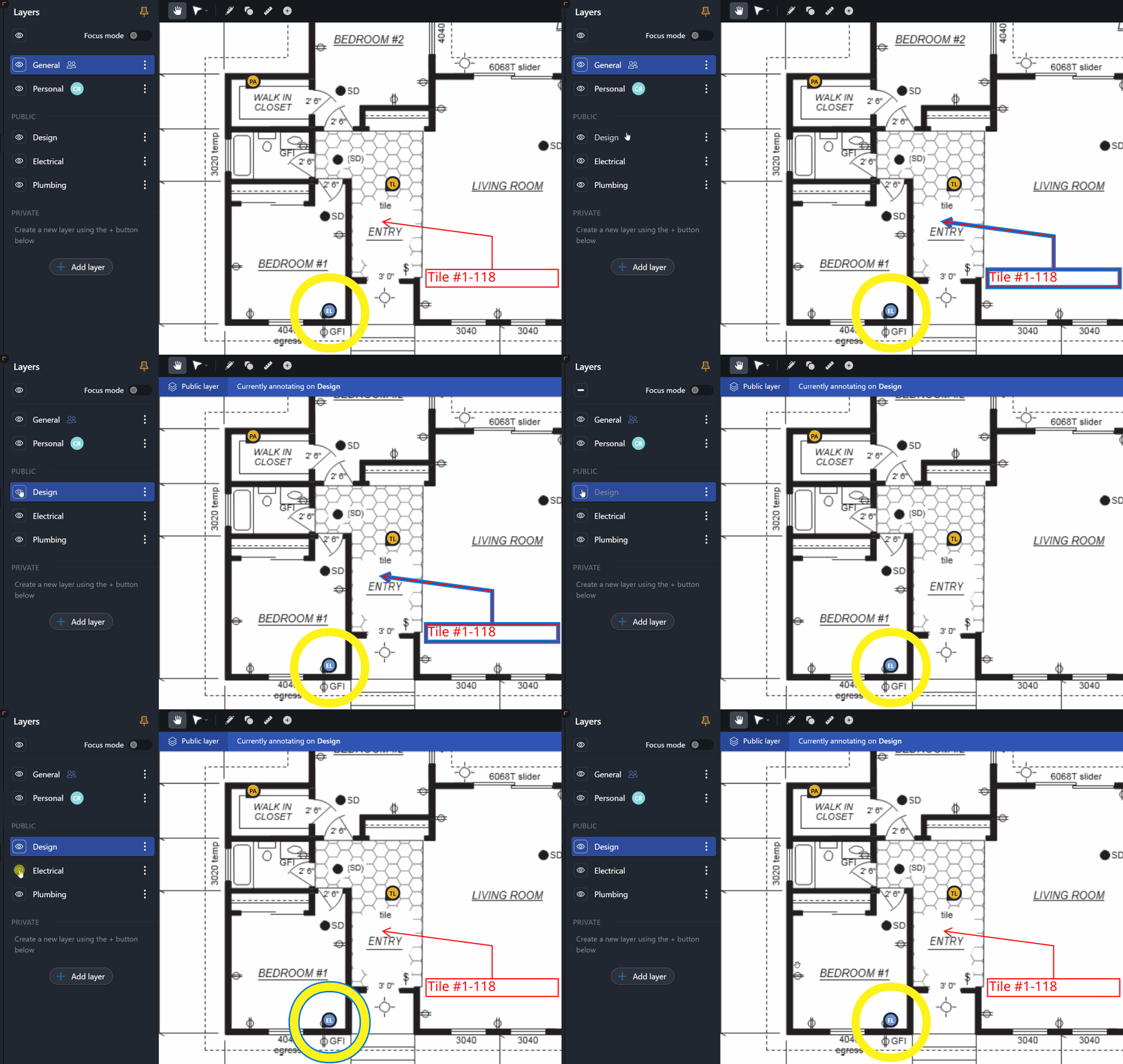
As projects advance and more teams contribute feedback to the drawings, information can accumulate quickly. Markup layers help keep things organized without losing the broader context you need on site.
Layers make it easier to:
It gives you a cleaner read of the drawing as work accelerates, making it simpler to follow the flow of feedback across trades without sorting through a tangle of overlapping markups.
Drawboard Projects supports the full arc of on-site work, from preparing with the right drawings, to capturing issues as they appear, to getting quick answers and closing out tasks with confidence.
By keeping everything tied to the drawing and updated in real time, field and office teams work from the same information. That shared view makes it easier to understand issues in context and stay aligned as conditions change.
Request a demo today to see how Projects can simplify your team’s on-site workflows.
On-site work rarely plays out exactly as the drawings predict. Installations don’t always align with design intent, unforeseen clashes surface once walls open up, and late design updates can shift priorities without much warning.
For supervisors and field technicians, noticing these issues is only part of the job. The harder part is capturing them clearly, getting timely input from the office, and ensuring nothing gets overlooked as the project moves forward.
Field observations often end up split between photos, messages, email threads, and handwritten notes, which makes it difficult to maintain a clear record of what needs action. When information is scattered, details slip through and progress slows.
Drawboard Projects brings everything into one workspace. Tasks, markups, and discussions stay attached to the drawings and update in real time, giving field and office teams a consistent, shared understanding of what was found and what still needs attention.
Here’s how you can use Drawboard Projects to make on-site work more efficient and reliable.
Before you even reach the site, it’s important to know you’re working from the most current information. Drawboard Projects keeps drawings and Tasks synced in real time, so any updates appear on your device immediately. You’re never left wondering whether the set you’re viewing is the latest or if something changed overnight.
At the same time, Drawboard Projects preserves a clear record of earlier versions. Older revisions remain accessible for reference, and overlays highlight exactly what has changed between sets. This makes it easier to understand how the design has evolved and identify areas that may need closer attention during your walkthrough.
Your Task List adds another layer of preparation. Tasks logged during earlier site walks or coordination sessions can be filtered by location, discipline, priority, or status, giving you a clear starting point for the day. Instead of arriving and deciding where to begin, you walk in with a focused view of the items that need follow-up and the areas worth revisiting.
Once you’re on site, work moves quickly. When you spot something that needs attention, whether it’s a clash, a discrepancy, or a QA concern, creating a Task directly on the drawing is the fastest way to capture it with the context intact.
Pinning a Task anchors the issue to its exact location, and from there you can record everything needed to make it actionable. Tasks support the structured details that keep follow-up work clear, including:
Because Tasks sync in real time, anything you add is visible to the office immediately. That means your notes, photos, and descriptions reach the right people without delay, and reviewers can understand what you captured in full context.
You can also sketch or highlight on the plan around the pinned Task to clarify what needs attention or show how the condition relates to nearby elements.
This keeps all field observations in one place, connected to the drawing, instead of scattered across phones, message threads, and separate checklists.
Tasks open up a direct line of communication with designers, engineers, and project managers. Each Task includes its own threaded discussion, keeping every question, approval, and clarification tied to the exact point on the drawing where the issue was found. You can tag specific decision-makers to send them a notification, pulling them into the conversation with full context right when you need their input.
Drawboard Projects keeps your drawings and Tasks up to date wherever you’re working. Because updates sync in real time, office teams see your photos, notes, and pinned Tasks the moment they’re added. With everything in one place — the location, your description, and your visuals — they can quickly understand the issue and provide accurate direction directly on the drawing or in the Task comments.
For field teams, that often means getting the guidance you need while you’re still on site, making it easier to address issues immediately and keep the project moving without unnecessary delays.
As work progresses, Tasks become a reliable framework for walkthroughs, inspections, and day-to-day coordination. Instead of juggling separate punch lists, handwritten notes, or issues logged in different tools, you can follow and update Tasks directly from the drawing.
During a walkthrough, the workflow becomes much more straightforward. You can:
This creates a live, shared view of progress that both field and office teams can trust. Everything is captured live as you go, ensuring it’s accurate, current, and tied directly to the drawing.
As projects advance and more teams contribute feedback to the drawings, information can accumulate quickly. Markup layers help keep things organized without losing the broader context you need on site.
Layers make it easier to:
It gives you a cleaner read of the drawing as work accelerates, making it simpler to follow the flow of feedback across trades without sorting through a tangle of overlapping markups.
Drawboard Projects supports the full arc of on-site work, from preparing with the right drawings, to capturing issues as they appear, to getting quick answers and closing out tasks with confidence.
By keeping everything tied to the drawing and updated in real time, field and office teams work from the same information. That shared view makes it easier to understand issues in context and stay aligned as conditions change.
Request a demo today to see how Projects can simplify your team’s on-site workflows.


We are a PDF and collaboration company. We believe that creating more effective connections between people reduces waste.
Our best work has been overtaken by busywork. That’s why we’ve created ways to help people get back to working wonders without any paper in sight.
Drawboard PDF lets you mark up and share with ease, and Drawboard Projects brings collaborative design review to architecture and engineering teams.
At Drawboard, we work our magic so our customers can get back to working theirs.
We are a PDF and collaboration company. We believe that creating more effective connections between people reduces waste.
Our best work has been overtaken by busywork. That’s why we’ve created ways to help people get back to working wonders without any paper in sight.
Drawboard PDF lets you mark up and share with ease, and Drawboard Projects brings collaborative design review to architecture and engineering teams.
At Drawboard, we work our magic so our customers can get back to working theirs.


