


Design reviews take longer than they should. Not because the decisions are hard, but because keeping a distributed team visually aligned through a session takes constant effort. When someone falls behind or misses a detail, the flow breaks and the whole group waits while you get them back on track. Those moments feel small, but they accumulate quickly across a project.
Part of the problem is that sharing visual context in a drawing review, without resorting to screen sharing or describing locations out loud, is difficult. Everyone is technically in the same session, but not necessarily looking at the same thing.
With Live Cursors and Presence now available in the Drawboard Projects Web App, that gap closes. You can see who's active across your project, follow where teammates are looking in real time, and keep the whole group oriented to the same part of the drawing throughout a session.
Here’s how those features help you run faster, smarter design reviews.
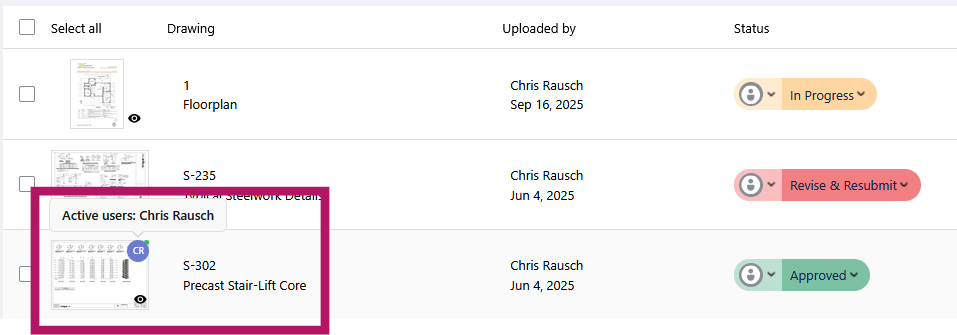
On large projects, it's easy to lose track of who is looking at what. A coordinator might need to loop in a colleague before responding to a query, but has no way to know if they're already in the relevant drawing or still catching up elsewhere. Presence solves that without requiring a message.
Presence indicators sit directly on your drawing and document lists, showing a teammate's avatar next to any drawing they currently have open. You can see at a glance who is active and where across your entire project, without opening a single drawing yourself.
Example: A project coordinator is preparing for an afternoon review and wants to confirm the lead engineer has looked at the updated structural drawings before the session starts. Rather than sending a message, they check the drawing list, see the engineer's avatar on the relevant sheets, and know the review can proceed as planned.
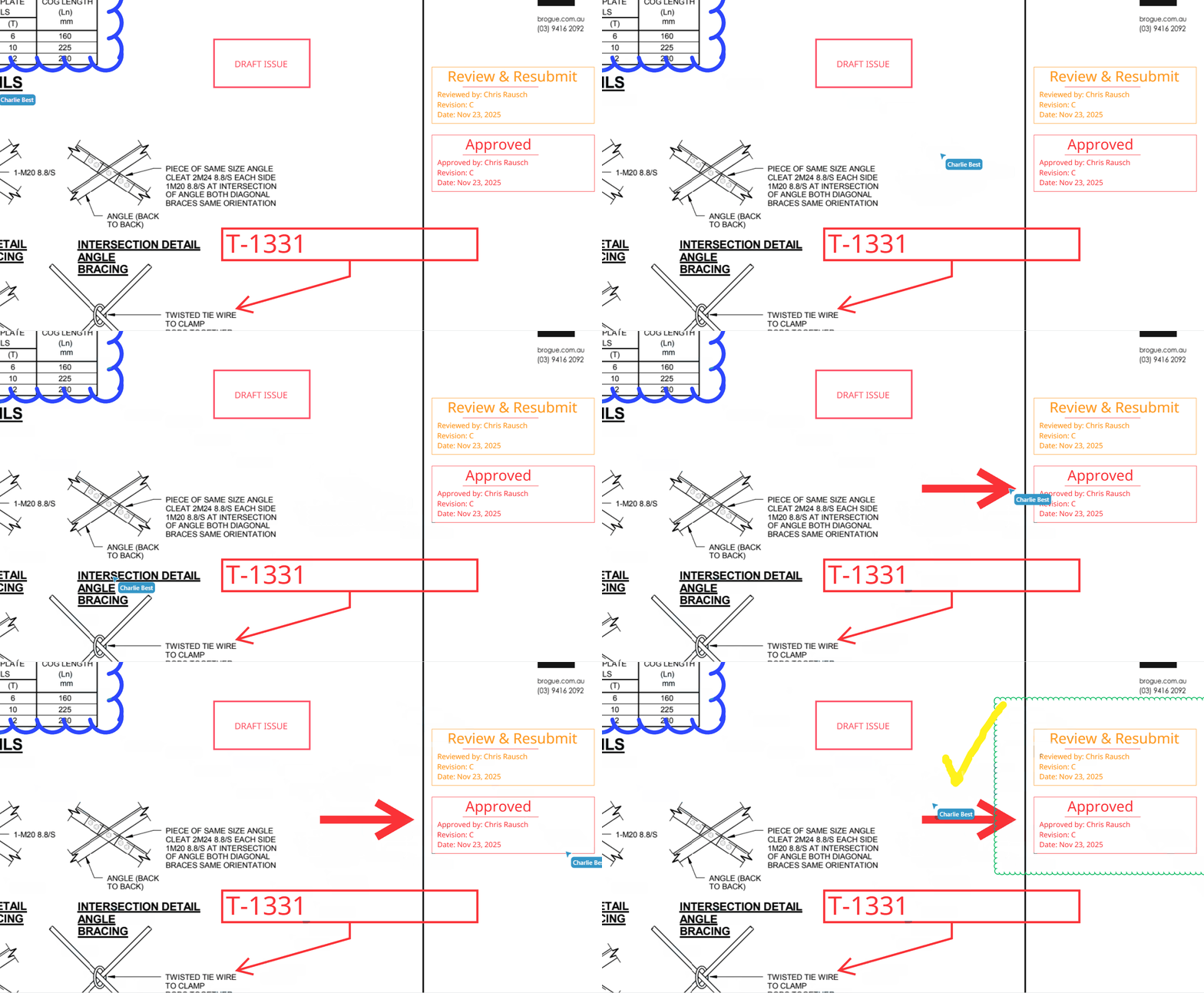
A lot of the friction in a drawing review on a call comes down to location. Describing where something is on a complex sheet takes time, and there is always a chance the other person is looking at a slightly different area. Pointing is faster, and now it works.
Once you're inside a drawing together, you can see your teammates' cursors moving in real time. Each cursor is labelled with the person's name or initials, so you always know who's pointing to what. You point to it, and the whole team sees it.
Example: A principal architect is on a call with a subcontractor reviewing an RFI. The architect moves their cursor directly to the affected detail, and the subcontractor sees it move in real time and responds immediately, without the usual back-and-forth to establish where on the sheet they're discussing.
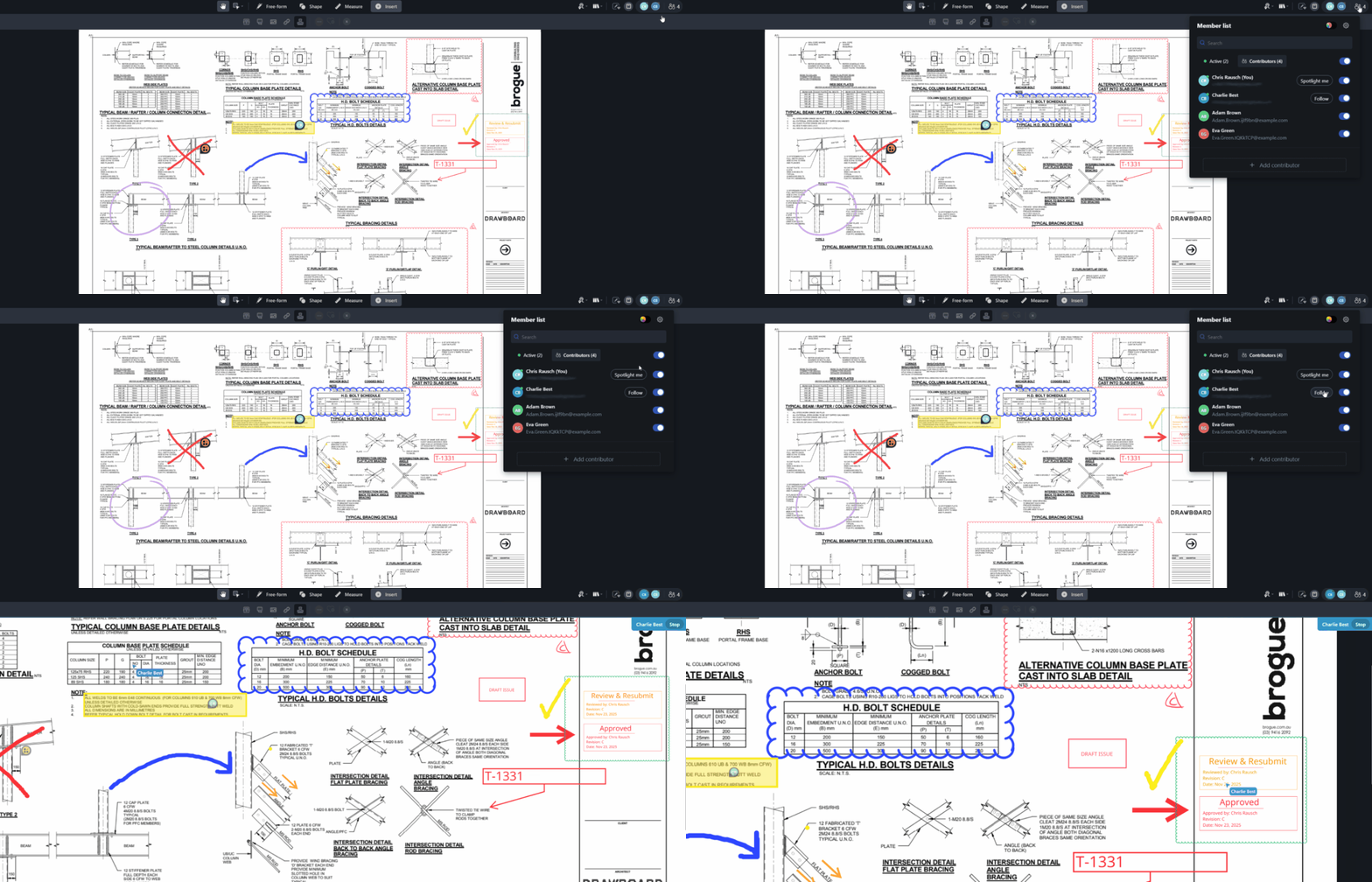
Even with live cursors visible, a group can drift during a longer review. Someone zooms in on a detail while the presenter has moved to the next sheet, and by the time they catch up the conversation has moved on. Spotlight keeps everyone together for the sessions where that matters.
Spotlight lets one person broadcast their current view to the team. Teammates can choose to follow, and their viewport will automatically mirror the presenter's as they pan, zoom, and navigate between drawings. This includes moving between drawings with the Multi Drawing View. It's great for structured design reviews, client presentations, and cross-discipline coordination sessions where you need to guide a group through information in sequence.
Example: A construction manager hosts a progress review with the site supervisor and the design team. They lead the group through the current drawing set and call out outstanding issues flagged in Tasks, with every participant automatically following their view.
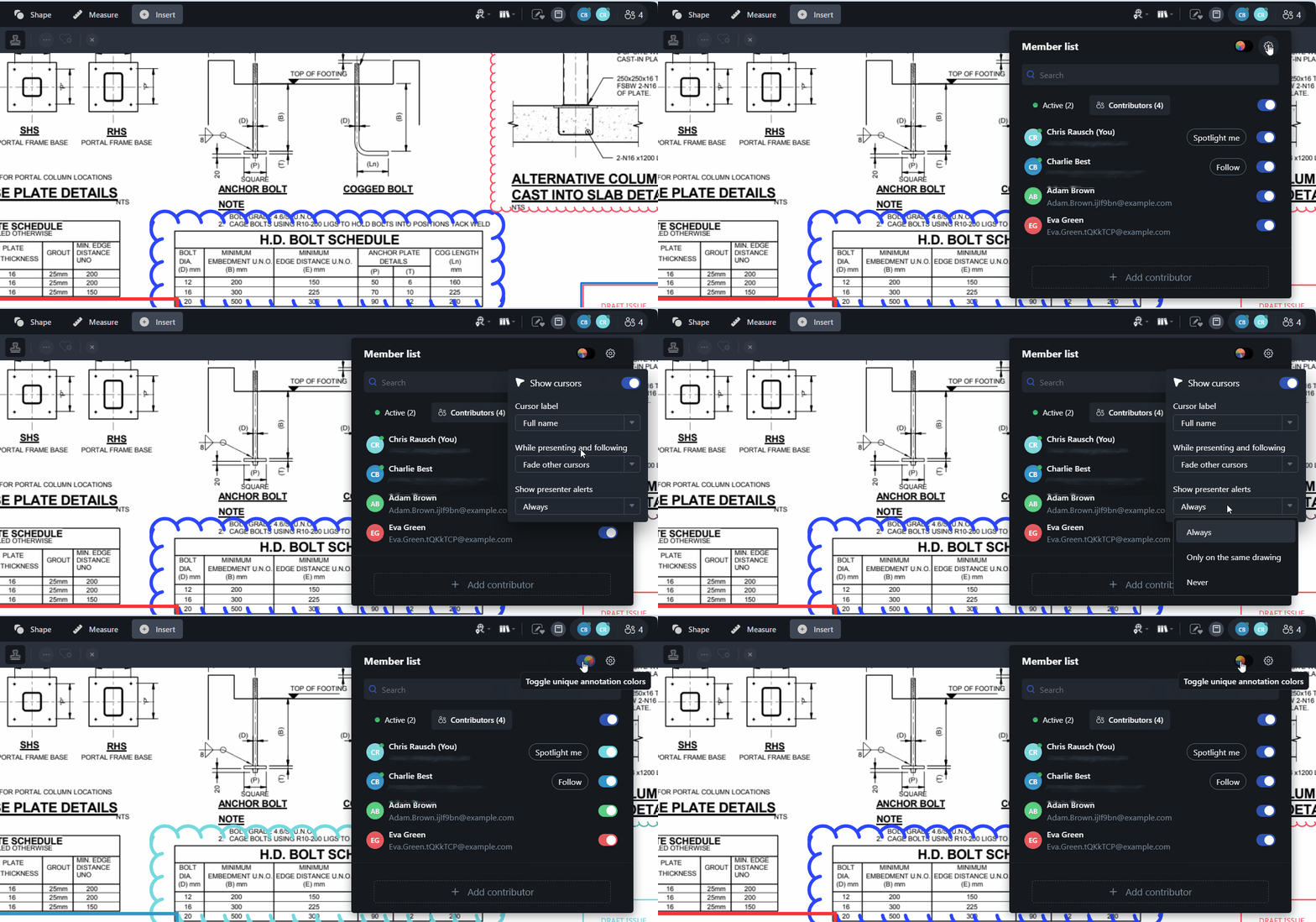
Live presence is most useful during active reviews and calls, but there are times when you want to work through a drawing without the visual noise of multiple cursors on screen. The toggle gives you control over when that context is visible.
You can switch cursor names and initials on or off at any point, which is useful during concentrated markup sessions where you want to stay focused without losing the awareness that others are present.
Example: A detailer is marking up a complex services coordination drawing alongside two other team members. They toggle off cursor names to focus on their own work, and switch visibility back on when the team needs to point to a specific location together.
Live Cursors and Presence sit alongside Tasks and your existing markup tools in Drawboard Projects. Together, they cover the full breadth of a design review: who's there, what they're looking at, what needs to happen, and who owns it.
For teams that spend a significant portion of their week in drawing reviews, that adds up. Less time re-orienting and re-establishing context means more time working through the actual content of a session, and more reviews that end with clear outcomes rather than a list of follow-up messages.
Both features are available now in the Drawboard Projects Web App. If you need a hand getting started, our Support Centre has step-by-step guides, and our team is happy to help.
Design reviews take longer than they should. Not because the decisions are hard, but because keeping a distributed team visually aligned through a session takes constant effort. When someone falls behind or misses a detail, the flow breaks and the whole group waits while you get them back on track. Those moments feel small, but they accumulate quickly across a project.
Part of the problem is that sharing visual context in a drawing review, without resorting to screen sharing or describing locations out loud, is difficult. Everyone is technically in the same session, but not necessarily looking at the same thing.
With Live Cursors and Presence now available in the Drawboard Projects Web App, that gap closes. You can see who's active across your project, follow where teammates are looking in real time, and keep the whole group oriented to the same part of the drawing throughout a session.
Here’s how those features help you run faster, smarter design reviews.
On large projects, it's easy to lose track of who is looking at what. A coordinator might need to loop in a colleague before responding to a query, but has no way to know if they're already in the relevant drawing or still catching up elsewhere. Presence solves that without requiring a message.
Presence indicators sit directly on your drawing and document lists, showing a teammate's avatar next to any drawing they currently have open. You can see at a glance who is active and where across your entire project, without opening a single drawing yourself.
Example: A project coordinator is preparing for an afternoon review and wants to confirm the lead engineer has looked at the updated structural drawings before the session starts. Rather than sending a message, they check the drawing list, see the engineer's avatar on the relevant sheets, and know the review can proceed as planned.
A lot of the friction in a drawing review on a call comes down to location. Describing where something is on a complex sheet takes time, and there is always a chance the other person is looking at a slightly different area. Pointing is faster, and now it works.
Once you're inside a drawing together, you can see your teammates' cursors moving in real time. Each cursor is labelled with the person's name or initials, so you always know who's pointing to what. You point to it, and the whole team sees it.
Example: A principal architect is on a call with a subcontractor reviewing an RFI. The architect moves their cursor directly to the affected detail, and the subcontractor sees it move in real time and responds immediately, without the usual back-and-forth to establish where on the sheet they're discussing.
Even with live cursors visible, a group can drift during a longer review. Someone zooms in on a detail while the presenter has moved to the next sheet, and by the time they catch up the conversation has moved on. Spotlight keeps everyone together for the sessions where that matters.
Spotlight lets one person broadcast their current view to the team. Teammates can choose to follow, and their viewport will automatically mirror the presenter's as they pan, zoom, and navigate between drawings. This includes moving between drawings with the Multi Drawing View. It's great for structured design reviews, client presentations, and cross-discipline coordination sessions where you need to guide a group through information in sequence.
Example: A construction manager hosts a progress review with the site supervisor and the design team. They lead the group through the current drawing set and call out outstanding issues flagged in Tasks, with every participant automatically following their view.
Live presence is most useful during active reviews and calls, but there are times when you want to work through a drawing without the visual noise of multiple cursors on screen. The toggle gives you control over when that context is visible.
You can switch cursor names and initials on or off at any point, which is useful during concentrated markup sessions where you want to stay focused without losing the awareness that others are present.
Example: A detailer is marking up a complex services coordination drawing alongside two other team members. They toggle off cursor names to focus on their own work, and switch visibility back on when the team needs to point to a specific location together.
Live Cursors and Presence sit alongside Tasks and your existing markup tools in Drawboard Projects. Together, they cover the full breadth of a design review: who's there, what they're looking at, what needs to happen, and who owns it.
For teams that spend a significant portion of their week in drawing reviews, that adds up. Less time re-orienting and re-establishing context means more time working through the actual content of a session, and more reviews that end with clear outcomes rather than a list of follow-up messages.
Both features are available now in the Drawboard Projects Web App. If you need a hand getting started, our Support Centre has step-by-step guides, and our team is happy to help.


We are a PDF and collaboration company. We believe that creating more effective connections between people reduces waste.
Our best work has been overtaken by busywork. That’s why we’ve created ways to help people get back to working wonders without any paper in sight.
Drawboard PDF lets you mark up and share with ease, and Drawboard Projects brings collaborative design review to architecture and engineering teams.
At Drawboard, we work our magic so our customers can get back to working theirs.
We are a PDF and collaboration company. We believe that creating more effective connections between people reduces waste.
Our best work has been overtaken by busywork. That’s why we’ve created ways to help people get back to working wonders without any paper in sight.
Drawboard PDF lets you mark up and share with ease, and Drawboard Projects brings collaborative design review to architecture and engineering teams.
At Drawboard, we work our magic so our customers can get back to working theirs.


