


Bluebeam Revu is the PDF markup tool most AEC firms measure others against. It's been built into the workflows of construction teams, engineering offices, and architect-led design reviews for over a decade. But with Revu 20 hitting end of life on December 31, 2026, and all supported plans requiring a subscription for every user, teams are taking a step back and looking at all their options before they sign up for a new annual plan.
For Windows-first teams, Revu’s native apps remain strong options. The toolset is deep, the CAD integrations are mature, and the main change is the move from a one-time purchase to an annual per-seat subscription. With Bluebeam recently ending native Apple support, teams working across Mac and iOS will want to weigh how much of the full Revu feature set their workflows require, and what they have access to, before committing to a plan.
This article breaks down what each Bluebeam subscription tier costs, what you actually get at each level, and where the platform limitations matter most, so you can work out whether it still makes sense for your team.
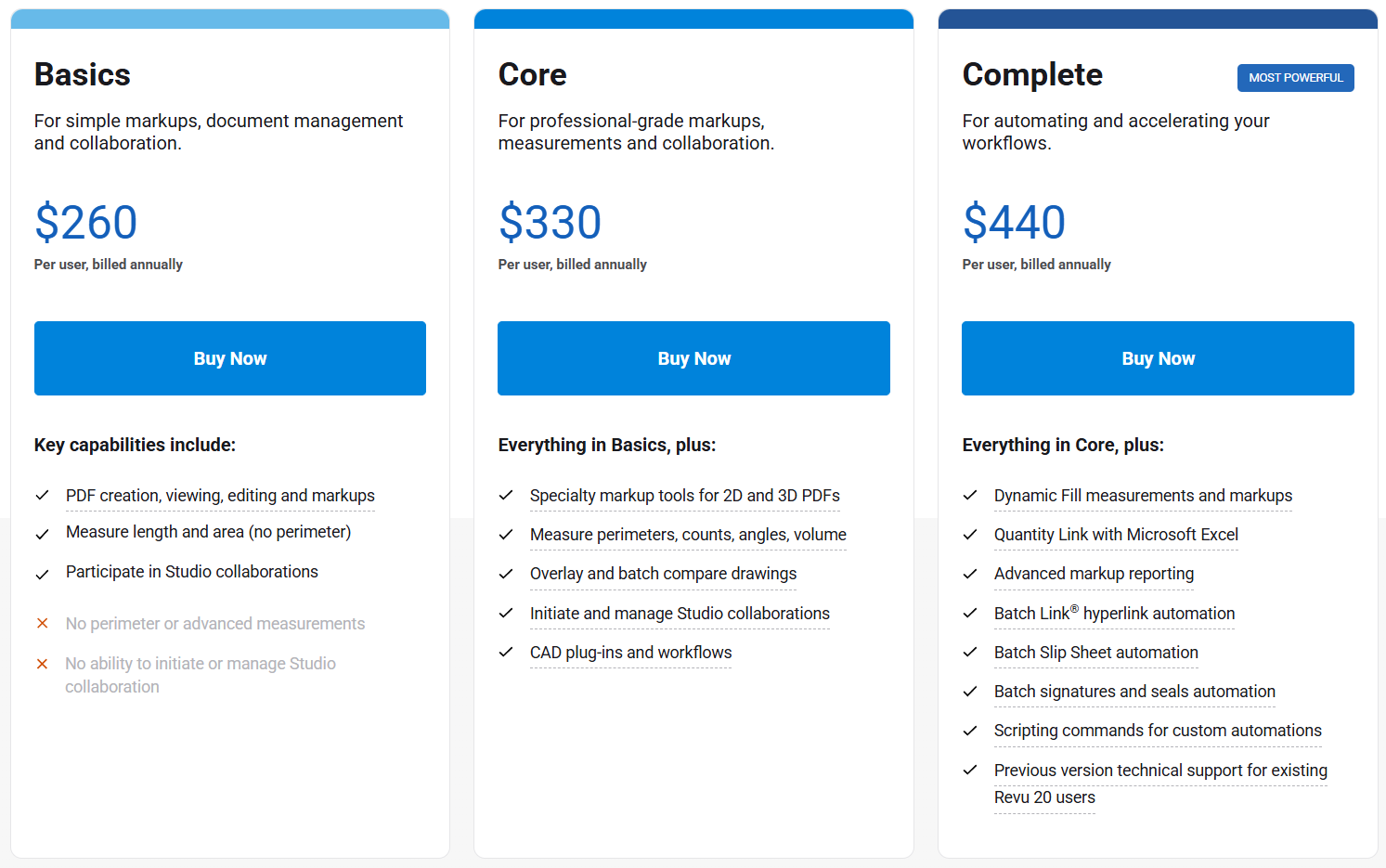
Bluebeam subscriptions are billed annually per named user. There's no monthly option and no longer perpetual licensing available. Three tiers cover the range from individual markup through to full team collaboration and batch automation.
Plans include cloud storage, phone and email support, and access to Bluebeam University training.
A free trial is available, and purchases come with a 30-day refund window. Volume discounts of 15–25% apply for larger deployments, typically 50+ seats, negotiated through enterprise sales.
You can also mix tiers across your team, so field reviewers and estimators don't have to be on the same plan.
What's included in each Bluebeam plan

Every plan ships with Revu for Windows, Bluebeam Cloud on web and iOS, Org Admin for managing seats, and real-time participation in existing Studio Sessions. The tier you're on determines whether you can create and own those sessions, which tools you get, and how much you can automate.
Bluebeam has also announced Bluebeam Max, an AI-enhanced tier now in limited release, with broader availability and pricing details to follow.
Basics covers the full individual PDF workflow: markup, document management, redaction, OCR, form creation, and digital signatures. It also lets you participate in Studio Sessions and Projects that others have set up.
What it doesn't give you is the ability to run those spaces yourself, or access the CAD integrations and advanced measurement tools that project-facing roles typically need.
What's included:
What requires Core or above:
Basics is the right fit for field staff, subcontractors, and anyone whose job is reviewing and responding to drawings rather than owning the review process. But it still requires at least one project admin on a higher-tier plan to start those workflows.
Core is the tier most project-facing roles require. If you need to set up Sessions, manage Projects, or control who has access, Basics isn't an option. The same applies if your team works directly from CAD files or needs measurement tools beyond basic length and area.
Key additions over Basics:
The addition of Studio and CAD integration makes Core the baseline for team workflows and collaboration. Without it, everyone has to work in a silo and share updates manually, which complicates handover, slows progress, and increases the chances of miscommunication.
Note: CAD integrations, advanced measurements, and overlay tools in Core are only available through Revu on Windows. Cloud users on this plan won't have access to them.
Complete is aimed at estimators and BIM leads doing high-volume, repetitive work on large drawing sets. Almost everything that separates it from Core is in the automation stack, so if your team doesn't run batch operations regularly, the extra $110/user/year doesn't change much about how you work day-to-day.
What Complete adds over Core:
For roles that do process large drawing sets repeatedly, the automation tools reduce manual effort that would otherwise compound across every project. Whether that justifies the cost depends on how frequently those workflows actually run in your team.
Note: The full automation stack in Complete is desktop-only. Cloud users on this plan are paying for capabilities they can't access.
The tier that fits depends more on how your team is structured and what your day-to-day work involves than on any single feature.
Bluebeam's plan tiers have hard limitations. Capabilities that don't exist on Basics can't be unlocked without upgrading, so it's important to understand what you need Bluebeam to do before committing to a plan.
All of the above assumes your team is working in Revu on Windows. The CAD integrations, advanced measurements, overlay tools, and automation stack in Core and Complete are desktop-only features. They're not available through Bluebeam Cloud, which is what Mac users and iOS users have access to.
If a meaningful portion of your team is off-Windows, the tier you choose may not deliver its full feature set to everyone paying for it.
Bluebeam has earned its place as the industry standard for good reason, and for the right team, it still delivers. The question in 2026 is whether your team fits that profile.
For Windows-first teams doing serious markup and measurement work, few tools match Revu's depth. The toolset is comprehensive, the CAD integrations with AutoCAD, Revit, and SolidWorks are mature and reliable, and the Studio collaboration layer gives project teams a well-established space for real-time review. Teams that have built workflows around Tool Chests, custom markup libraries, and CAD pipelines will find that investment pays off every day they're in the product.
Bluebeam also scales well across mixed role types. The ability to assign different tiers to different team members means field staff, project managers, and estimators can each be on a plan that fits their actual needs, rather than paying a flat rate across the board. For larger organizations with settled Windows-first workflows, that flexibility makes the per-seat cost easier to justify.
And with Bluebeam Max now in limited release, offering features like AI-assisted drawing review, natural language markup commands, and BIM integration, teams sticking with Bluebeam will be able to boost efficiency on devices that support Revu.
Bluebeam is a capable tool on Windows, but cross-platform teams consistently run into its limits.
The retirement of native iPad support at the end of 2025 means there's no longer a dedicated Apple app, and Mac and iOS users are working through Bluebeam Cloud rather than the full Revu desktop experience. That gap is noticeable in daily workflows, and it compounds on higher-tier plans where CAD integrations, advanced measurements, and automation tools are desktop-only. Teams on Core or Complete whose members aren't on Windows are paying for capabilities they can't access.
External collaboration adds another consideration. Studio requires a paid seat for every participant, which means clients, consultants, and subcontractors joining a review all need a licence. For teams that regularly bring outside parties into the process, that adds cost and friction that isn't always obvious when evaluating the platform upfront.
The switch to annual subscriptions is another factor to consider. Revu 20's support ends December 31, 2026, which means teams coasting on a perpetual license are facing a new recurring cost, and new adopters are committing to a plan starting at $260 per user per year from day one. That's a meaningful investment either way, and it's worth accounting for the learning curve that comes with it. Revu is a deep tool, and for teams switching from another platform, there's also the work of rebuilding the libraries and pipelines they've left behind.
For some teams, those are manageable tradeoffs. For others, they're the reason to look elsewhere.
Renewing is always the path of least resistance, and for teams with years of Tool Chests, markup libraries, and CAD pipelines built around Revu, switching can feel like more disruption than it's worth.
But if the platform's limitations are genuinely affecting how your team works, workarounds only go so far. Switching tools is often the better long-term call, particularly when most of what you've built in Bluebeam can be transferred or rebuilt in a platform that fits your team better.
Here are some of the most common alternatives to Bluebeam. For a more detailed breakdown, check out our in-depth Bluebeam alternatives guide.

Drawboard Projects is built for teams who want design reviews to work consistently across all their devices. Where Bluebeam users on Mac or iPad are working through a reduced web experience, Drawboard Projects offers a complete tool kit whether you're on the native Windows app, iOS, or the web.
Markups sync in real time across all contributors, so everyone sees the latest updates during a review without session management or file consolidation. Task pins let teams flag issues directly on drawings with due dates, custom statuses, and photo attachments, and threaded conversations stay anchored to their location on the sheet. Revisions are automatically stacked, so tracking how decisions evolved across iterations doesn't require manual version management.
External collaboration is simpler too. Free guest access lets clients and consultants join a review without a paid licence, which is something that requires a seat in Bluebeam's Studio model. Layered markups with contributor attribution keep responsibilities clear across disciplines, and OCR-assisted sheet intake speeds up the upload process considerably.
For teams already working in Revit, Procore, or Aconex, Drawboard Projects integrates directly. API and webhook access is available on Enterprise for custom integrations. And if your team's primary need is individual PDF markup rather than collaborative review, Drawboard PDF offers native apps across Mac, Windows, iPad, and iOS, with pricing that Bluebeam Basics can’t compete with.
Drawboard Projects features

Procore is worth considering if your frustration with Bluebeam goes beyond platform support and into the limits of a markup-first tool. It's a full construction project management platform that supports RFIs, submittals, budgets, schedules, and document control, all connected in one place.
For teams managing complex projects where drawing review is one part of a larger coordination problem, that integration offers an advantage over Bluebeam. It's also cloud-based and works across devices, which addresses the platform gap, but the implementation is considerably heavier than Bluebeam and the cost reflects that. It's not a like-for-like replacement; it's a broader commitment for different reasons.
Procore features

Forma Build combines document management, field execution, and project management into one platform. Unlike Bluebeam, it also works consistently across devices without a reduced experience on iOS or web.
Teams can manage drawing sets, track issues, run punch lists, and handle RFIs and submittals, with strong mobile support designed for field teams rather than bolted on. It sits inside the Autodesk Construction Cloud alongside BIM 360, Revit, and Autodesk Docs, which makes it a natural fit for organisations already standardised on Autodesk tooling.
For teams that aren't, the breadth of the platform can feel like more than they need, and the value is harder to justify without the broader ecosystem to connect it to.
Forma Build features
Bluebeam remains a capable tool for the workflows it was built for. But with the subscription transition complete, native Apple support gone, and the Revu 20 deadline approaching, the decision to stay or switch is more active than it's been in years.
If your team is Windows-first with settled workflows, renewing may make sense. If you're working around platform gaps or being pushed to subscription without getting full value from your seats, it's worth taking a serious look at what else fits.
Don't wait for the Revu 20 deadline to force the decision. Start a free 30-day trial of Drawboard Projects today, or book a demo to see it in action first.
Not natively. Bluebeam discontinued Revu for Mac in 2020 and it reached official end of life in June 2023. Mac users today have two options: Bluebeam Cloud in the browser, or running Windows Revu through Parallels virtualization, which Bluebeam doesn't officially support. Neither delivers the full Revu feature set.
For more detail on the Mac options and alternatives, we've covered it in full here.
No. Bluebeam ended perpetual license sales in September 2023. Revu 20, the last version sold as a one-time purchase, reaches end of life on December 31, 2026, after which Studio access and technical support end for those users.
Yes. Bluebeam offers a free trial, and there's a 30-day refund window on purchases.
Yes, for larger deployments: typically 15–25% for 50+ seats. These are negotiated through enterprise sales rather than the standard self-serve flow.
After December 31, 2026, Revu 20 users lose access to Studio, Bluebeam's cloud collaboration layer, along with technical support and security patches. The desktop application will technically continue to function, but without Studio, the collaborative review workflow breaks. Teams still on Revu 20 need to move to subscription before that date to avoid disruption.
The core difference is platform and collaboration model. Bluebeam is a Windows desktop application with cloud collaboration added on. Drawboard Projects is built around real-time multi-user markup as the default, with full feature parity across Windows, iOS, and web.
For teams whose primary need is collaborative design review rather than CAD-integrated batch processing, Drawboard Projects tends to be a simpler, more consistent experience across the full team.
Bluebeam Revu is the PDF markup tool most AEC firms measure others against. It's been built into the workflows of construction teams, engineering offices, and architect-led design reviews for over a decade. But with Revu 20 hitting end of life on December 31, 2026, and all supported plans requiring a subscription for every user, teams are taking a step back and looking at all their options before they sign up for a new annual plan.
For Windows-first teams, Revu’s native apps remain strong options. The toolset is deep, the CAD integrations are mature, and the main change is the move from a one-time purchase to an annual per-seat subscription. With Bluebeam recently ending native Apple support, teams working across Mac and iOS will want to weigh how much of the full Revu feature set their workflows require, and what they have access to, before committing to a plan.
This article breaks down what each Bluebeam subscription tier costs, what you actually get at each level, and where the platform limitations matter most, so you can work out whether it still makes sense for your team.
Bluebeam subscriptions are billed annually per named user. There's no monthly option and no longer perpetual licensing available. Three tiers cover the range from individual markup through to full team collaboration and batch automation.
Plans include cloud storage, phone and email support, and access to Bluebeam University training.
A free trial is available, and purchases come with a 30-day refund window. Volume discounts of 15–25% apply for larger deployments, typically 50+ seats, negotiated through enterprise sales.
You can also mix tiers across your team, so field reviewers and estimators don't have to be on the same plan.
What's included in each Bluebeam plan
Every plan ships with Revu for Windows, Bluebeam Cloud on web and iOS, Org Admin for managing seats, and real-time participation in existing Studio Sessions. The tier you're on determines whether you can create and own those sessions, which tools you get, and how much you can automate.
Bluebeam has also announced Bluebeam Max, an AI-enhanced tier now in limited release, with broader availability and pricing details to follow.
Basics covers the full individual PDF workflow: markup, document management, redaction, OCR, form creation, and digital signatures. It also lets you participate in Studio Sessions and Projects that others have set up.
What it doesn't give you is the ability to run those spaces yourself, or access the CAD integrations and advanced measurement tools that project-facing roles typically need.
What's included:
What requires Core or above:
Basics is the right fit for field staff, subcontractors, and anyone whose job is reviewing and responding to drawings rather than owning the review process. But it still requires at least one project admin on a higher-tier plan to start those workflows.
Core is the tier most project-facing roles require. If you need to set up Sessions, manage Projects, or control who has access, Basics isn't an option. The same applies if your team works directly from CAD files or needs measurement tools beyond basic length and area.
Key additions over Basics:
The addition of Studio and CAD integration makes Core the baseline for team workflows and collaboration. Without it, everyone has to work in a silo and share updates manually, which complicates handover, slows progress, and increases the chances of miscommunication.
Note: CAD integrations, advanced measurements, and overlay tools in Core are only available through Revu on Windows. Cloud users on this plan won't have access to them.
Complete is aimed at estimators and BIM leads doing high-volume, repetitive work on large drawing sets. Almost everything that separates it from Core is in the automation stack, so if your team doesn't run batch operations regularly, the extra $110/user/year doesn't change much about how you work day-to-day.
What Complete adds over Core:
For roles that do process large drawing sets repeatedly, the automation tools reduce manual effort that would otherwise compound across every project. Whether that justifies the cost depends on how frequently those workflows actually run in your team.
Note: The full automation stack in Complete is desktop-only. Cloud users on this plan are paying for capabilities they can't access.
The tier that fits depends more on how your team is structured and what your day-to-day work involves than on any single feature.
Bluebeam's plan tiers have hard limitations. Capabilities that don't exist on Basics can't be unlocked without upgrading, so it's important to understand what you need Bluebeam to do before committing to a plan.
All of the above assumes your team is working in Revu on Windows. The CAD integrations, advanced measurements, overlay tools, and automation stack in Core and Complete are desktop-only features. They're not available through Bluebeam Cloud, which is what Mac users and iOS users have access to.
If a meaningful portion of your team is off-Windows, the tier you choose may not deliver its full feature set to everyone paying for it.
Bluebeam has earned its place as the industry standard for good reason, and for the right team, it still delivers. The question in 2026 is whether your team fits that profile.
For Windows-first teams doing serious markup and measurement work, few tools match Revu's depth. The toolset is comprehensive, the CAD integrations with AutoCAD, Revit, and SolidWorks are mature and reliable, and the Studio collaboration layer gives project teams a well-established space for real-time review. Teams that have built workflows around Tool Chests, custom markup libraries, and CAD pipelines will find that investment pays off every day they're in the product.
Bluebeam also scales well across mixed role types. The ability to assign different tiers to different team members means field staff, project managers, and estimators can each be on a plan that fits their actual needs, rather than paying a flat rate across the board. For larger organizations with settled Windows-first workflows, that flexibility makes the per-seat cost easier to justify.
And with Bluebeam Max now in limited release, offering features like AI-assisted drawing review, natural language markup commands, and BIM integration, teams sticking with Bluebeam will be able to boost efficiency on devices that support Revu.
Bluebeam is a capable tool on Windows, but cross-platform teams consistently run into its limits.
The retirement of native iPad support at the end of 2025 means there's no longer a dedicated Apple app, and Mac and iOS users are working through Bluebeam Cloud rather than the full Revu desktop experience. That gap is noticeable in daily workflows, and it compounds on higher-tier plans where CAD integrations, advanced measurements, and automation tools are desktop-only. Teams on Core or Complete whose members aren't on Windows are paying for capabilities they can't access.
External collaboration adds another consideration. Studio requires a paid seat for every participant, which means clients, consultants, and subcontractors joining a review all need a licence. For teams that regularly bring outside parties into the process, that adds cost and friction that isn't always obvious when evaluating the platform upfront.
The switch to annual subscriptions is another factor to consider. Revu 20's support ends December 31, 2026, which means teams coasting on a perpetual license are facing a new recurring cost, and new adopters are committing to a plan starting at $260 per user per year from day one. That's a meaningful investment either way, and it's worth accounting for the learning curve that comes with it. Revu is a deep tool, and for teams switching from another platform, there's also the work of rebuilding the libraries and pipelines they've left behind.
For some teams, those are manageable tradeoffs. For others, they're the reason to look elsewhere.
Renewing is always the path of least resistance, and for teams with years of Tool Chests, markup libraries, and CAD pipelines built around Revu, switching can feel like more disruption than it's worth.
But if the platform's limitations are genuinely affecting how your team works, workarounds only go so far. Switching tools is often the better long-term call, particularly when most of what you've built in Bluebeam can be transferred or rebuilt in a platform that fits your team better.
Here are some of the most common alternatives to Bluebeam. For a more detailed breakdown, check out our in-depth Bluebeam alternatives guide.
Drawboard Projects is built for teams who want design reviews to work consistently across all their devices. Where Bluebeam users on Mac or iPad are working through a reduced web experience, Drawboard Projects offers a complete tool kit whether you're on the native Windows app, iOS, or the web.
Markups sync in real time across all contributors, so everyone sees the latest updates during a review without session management or file consolidation. Task pins let teams flag issues directly on drawings with due dates, custom statuses, and photo attachments, and threaded conversations stay anchored to their location on the sheet. Revisions are automatically stacked, so tracking how decisions evolved across iterations doesn't require manual version management.
External collaboration is simpler too. Free guest access lets clients and consultants join a review without a paid licence, which is something that requires a seat in Bluebeam's Studio model. Layered markups with contributor attribution keep responsibilities clear across disciplines, and OCR-assisted sheet intake speeds up the upload process considerably.
For teams already working in Revit, Procore, or Aconex, Drawboard Projects integrates directly. API and webhook access is available on Enterprise for custom integrations. And if your team's primary need is individual PDF markup rather than collaborative review, Drawboard PDF offers native apps across Mac, Windows, iPad, and iOS, with pricing that Bluebeam Basics can’t compete with.
Drawboard Projects features
Procore is worth considering if your frustration with Bluebeam goes beyond platform support and into the limits of a markup-first tool. It's a full construction project management platform that supports RFIs, submittals, budgets, schedules, and document control, all connected in one place.
For teams managing complex projects where drawing review is one part of a larger coordination problem, that integration offers an advantage over Bluebeam. It's also cloud-based and works across devices, which addresses the platform gap, but the implementation is considerably heavier than Bluebeam and the cost reflects that. It's not a like-for-like replacement; it's a broader commitment for different reasons.
Procore features
Forma Build combines document management, field execution, and project management into one platform. Unlike Bluebeam, it also works consistently across devices without a reduced experience on iOS or web.
Teams can manage drawing sets, track issues, run punch lists, and handle RFIs and submittals, with strong mobile support designed for field teams rather than bolted on. It sits inside the Autodesk Construction Cloud alongside BIM 360, Revit, and Autodesk Docs, which makes it a natural fit for organisations already standardised on Autodesk tooling.
For teams that aren't, the breadth of the platform can feel like more than they need, and the value is harder to justify without the broader ecosystem to connect it to.
Forma Build features
Bluebeam remains a capable tool for the workflows it was built for. But with the subscription transition complete, native Apple support gone, and the Revu 20 deadline approaching, the decision to stay or switch is more active than it's been in years.
If your team is Windows-first with settled workflows, renewing may make sense. If you're working around platform gaps or being pushed to subscription without getting full value from your seats, it's worth taking a serious look at what else fits.
Don't wait for the Revu 20 deadline to force the decision. Start a free 30-day trial of Drawboard Projects today, or book a demo to see it in action first.
Not natively. Bluebeam discontinued Revu for Mac in 2020 and it reached official end of life in June 2023. Mac users today have two options: Bluebeam Cloud in the browser, or running Windows Revu through Parallels virtualization, which Bluebeam doesn't officially support. Neither delivers the full Revu feature set.
For more detail on the Mac options and alternatives, we've covered it in full here.
No. Bluebeam ended perpetual license sales in September 2023. Revu 20, the last version sold as a one-time purchase, reaches end of life on December 31, 2026, after which Studio access and technical support end for those users.
Yes. Bluebeam offers a free trial, and there's a 30-day refund window on purchases.
Yes, for larger deployments: typically 15–25% for 50+ seats. These are negotiated through enterprise sales rather than the standard self-serve flow.
After December 31, 2026, Revu 20 users lose access to Studio, Bluebeam's cloud collaboration layer, along with technical support and security patches. The desktop application will technically continue to function, but without Studio, the collaborative review workflow breaks. Teams still on Revu 20 need to move to subscription before that date to avoid disruption.
The core difference is platform and collaboration model. Bluebeam is a Windows desktop application with cloud collaboration added on. Drawboard Projects is built around real-time multi-user markup as the default, with full feature parity across Windows, iOS, and web.
For teams whose primary need is collaborative design review rather than CAD-integrated batch processing, Drawboard Projects tends to be a simpler, more consistent experience across the full team.


We are a PDF and collaboration company. We believe that creating more effective connections between people reduces waste.
Our best work has been overtaken by busywork. That’s why we’ve created ways to help people get back to working wonders without any paper in sight.
Drawboard PDF lets you mark up and share with ease, and Drawboard Projects brings collaborative design review to architecture and engineering teams.
At Drawboard, we work our magic so our customers can get back to working theirs.
We are a PDF and collaboration company. We believe that creating more effective connections between people reduces waste.
Our best work has been overtaken by busywork. That’s why we’ve created ways to help people get back to working wonders without any paper in sight.
Drawboard PDF lets you mark up and share with ease, and Drawboard Projects brings collaborative design review to architecture and engineering teams.
At Drawboard, we work our magic so our customers can get back to working theirs.


